AEM Migration from On‑Prem to AEM as a Cloud Service (AEMaaCS)
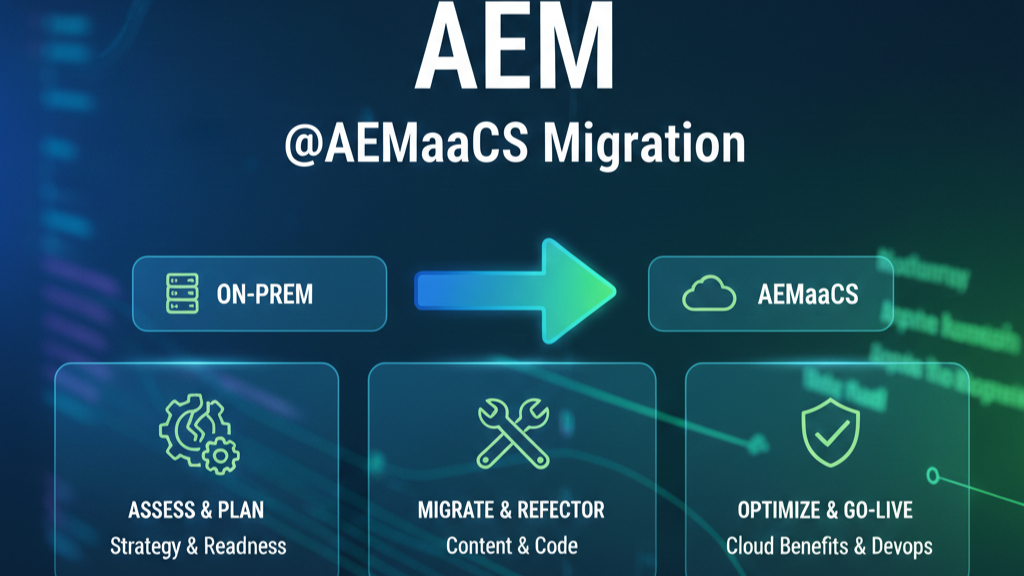
Migrating from AEM 6.x (on‑prem/AMS) to AEM as a Cloud Service is not a lift‑and‑shift. It’s a modernization journey that touches architecture, code, content, operations, and teams. This guide consolidates the end‑to‑end approach—including what’s changed in AEMaaCS, how to remediate those changes, and a phased methodology (Readiness → Implementation → Go‑Live → Optimization). It also maps Adobe’s official tools (BPA, CAM, Modernization suite, Repository Modernizer, Asset Workflow Migration, Dispatcher Converter, Index Converter) to practical steps.
What’s Different in AEMaaCS (and Why It Matters)
Below are the notable changes you must account for when migrating, with concrete actions to handle each.
a) /apps and /libs are immutable at runtime
In Cloud Service, the repository is split into immutable (code) and mutable (content) areas. /apps and /libs are immutable and cannot be changed after startup. Everything else (e.g., /content, /conf, /var, /etc, /oak:index, /system, /tmp) is mutable. Packaging must respect this split, and /oak:index—although mutable at runtime—must be deployed as code to allow controlled reindexing during blue‑green deploys.
How to handle
Restructure to the Cloud archetype: one container package (all) embedding ui.apps (code), ui.config (OSGi), and ui.content (content). Never mix mutable and immutable paths in the same package.
Use Repository Modernizer to automate package restructuring and then fix residual issues manually.
b) OSGi bundles & configurations are code (no runtime edits)
You cannot edit OSGi configs via /system/console or directly in runtime on AEMaaCS; all configs ship as code (ui.config) and are deployed through Cloud Manager pipelines. Use RepoInit for service users, groups, and initial nodes.
How to handle
Move OSGi configs under /apps/<proj>/osgiconfig as code; avoid custom runmodes beyond those Cloud Service supports. Use RepoInit for security/bootstrap tasks.
c) Changes to publish repository are not allowed directly
Publish tier content is updated via distribution from Author, not by direct mutation or package installs.
How to handle
Model all publish updates as publication (Manage Publication, Quick Publish, or Tree Activation workflow step). Avoid ad‑hoc edits/packages on publish
d) Custom runmodes are not allowed
Only Adobe‑provided runmodes (e.g., author, publish + dev, stage, prod, plus RDEs) are supported. Custom names are not.
How to handle
Consolidate configs into supported runmodes; refactor any custom runmode‑named configs to dev, stage, or prod, scoped by author or publish.
e) Replication Agents removed → Sling Content Distribution (SCD)
Classic agents are replaced by SCD backed by Adobe’s pipeline. Distribution is queue‑based and auto‑scales with publish nodes; no manual agent per publish instance.
How to handle
Remove custom logic bound to replication agents (flush agents, transports). If you implemented custom replication hooks, redesign them for SCD or leverage workflows (e.g., Tree Activation step) and dispatcher invalidation via the Cloud stack.
f) Classic UI removed
Move authoring to Touch UI and modern dialogs; migrate classic components and dialogs.
How to handle
Use AEM Modernization Tools (dialog/page/component conversion) to move Classic UI → Touch UI, Static Templates → Editable, Foundation → Core Components/proxies.
g) Publish‑side delivery & edge
Content is delivered from publish nodes behind Dispatcher and the integrated CDN; delivery patterns differ from fixed on‑prem topologies and must be tested with Cloud Dispatcher SDK and Cloud Manager.
How to handle
Convert legacy dispatcher configs with Dispatcher Converter and validate with Dispatcher SDK locally and in Cloud pipelines.
h) Asset handling & delivery
Asset processing uses Asset Microservices (processing profiles) and the Asset Compute Service, changing how DAM Update Asset workflows operate.
How to handle
Migrate legacy asset workflows using Asset Workflow Migration Tool; replace unsupported steps with processing profiles and OSGi configs. Validate Dynamic Media/Asset Compute integrations.
Migration Methodology: Readiness → Implementation → Go‑Live → Optimization
Adobe’s official migration journey breaks into four phases. Below, each phase includes core activities and a timeline diagram that you can adapt for your project plan.
Phase A: Readiness
Objectives
- Understand AEMaaCS changes and constraints.
- Baseline your implementation with BPA; load results into CAM for guided analysis.
- Inventory code, content, integrations, and indexes; identify modernization backlogs.
Key steps & outputs
- Run BPA on a clone of production AEM 6.x (or closest stage) and export the report (CSV/JSON).
- In CAM: Create a project → Readiness → Best Practices Analysis → Upload BPA report. Review findings and complexity assessment.
- Plan modernization: Classic→Touch UI, Static→Editable templates, Foundation→Core Components, repository restructuring, dispatcher/index conversions, workflow & asset processing changes
Readiness
│
├─ Stand up stage/clone → Install BPA → Generate & export report
│             Deliverable: BPA CSV + initial risk/complexity notes
│
├─ Create CAM project → Upload BPA → Review Readiness insights
│             Deliverable: CAM assessment, modernization backlog
│
└─ Architecture delta analysis, migration plan, resourcing, KTLO plan
              Deliverable: Signed migration plan & phase gates
What BPA looks for (examples)
Application functionality needing refactor; repository items moved; legacy UI to modernize; deployment/misconfig issues; and features replaced/unsupported in AEMaaCS.
CAM value
One place to orchestrate migration activities; organizes Readiness → Implementation → Go‑Live, and surfaces best practices, tools, and artifacts
Phase B: Implementation
Objectives
- Modernize code, content structures, dispatcher, indexes, and workflows for Cloud.
- Prepare CI/CD via Cloud Manager; refactor OSGi and runmodes; convert templates/components
Key tools & tasks
- Modernization Tools: All‑in‑One Converter, Page Structure Conversion, Component Conversion, Policy Import to move Static → Editable templates, design configs → policies, Foundation → Core Components, Classic → Touch UI.
- Repository Modernizer: Split mutable vs. immutable; create all, ui.apps, ui.config, ui.content. Available standalone and via Adobe I/O CLI; also surfaced in CAM refactoring service.
- Asset Workflow Migration Tool: Convert DAM workflows to processing profiles/OSGi.
- Dispatcher Converter: Transform dispatcher configs for Cloud; validate with Dispatcher SDK.
- Index Converter: Migrate custom Lucene Oak indexes; ensure versioned *-custom-* naming, remove deprecated/ensure‑defs; deploy via pipeline.
- Content Transfer Tool (CTT) planning (not detailed here, but part of Implementation → Go‑Live).
Implementation
│
├─ Repo modernization (split code/content), OSGi-as-code, runmode cleanup
│              Deliverable: Cloud-compliant project structure; pipelines stubbed
│
├─ Modernize templates/components/dialogs; Policy Import to /conf
│              Deliverable: Touch UI, Editable Templates, Core Component proxies
│
├─ Dispatcher Converter + local SDK validation; Index Converter adjustments
│              Deliverable: Cloud-ready dispatcher; versioned Lucene indexes
│
├─ Asset Workflow Migration (processing profiles); remove unsupported steps
│              Deliverable: Profiles + configs replacing legacy DAM workflows
│
└─ Integration tests; performance, authoring UAT; fix BPA/CAM “Major/Critical”
               Deliverable: Release candidate for Go‑Live rehearsal
Phase C: Go‑Live
Objectives
Dry‑run content migration and cutover; validate publication/distribution; finalize dispatcher/CDN behaviors; execute production cut.
Key steps
- CTT rehearsal (extract → migrate set → ingest) for Author and (as required) Publish, then Production cutover using planned freeze windows.
- Verify Sling Content Distribution publishes across scaled publish nodes; validate cache/invalidations and error handling.
- Cloud Manager deployment gates (security, quality, perf tests) pass green.
Go‑Live
│
├─ Final rehearsal – content delta, functional & perf verification
│
├─ Code freeze; final dispatcher/indexes; pre-warm; author training refresh
│
├─ Cutover window – final CTT ingest; enable prod pipelines; smoke test
│
└─ Hypercare; address cache/index/processing edge cases
Phase D: Optimization (Post Go‑Live)
Objectives
Continuous improvement: monitor, optimize queries/indexes, tune cache policies, and keep modernization momentum.
Focus areas
- Slow queries & index health; ensure proper indexes and versioning pattern (*-custom-n).
- Maintenance tasks (audit log, DS GC, Lucene binaries cleanup, revision/version/workflow purges) appropriately scheduled for Cloud patterns.
- Authoring quality: component/library rationalization and Core Components adoption rate; additional modernization passes (AIO tools).
Optimization
│
├─ Monthly: Review CAM items, address new BPA findings, dependency upgrades
├─ Quarterly: Query/index review; Core Components delta analysis
└─ Continuous: Dispatcher/CDN tuning; author enablement; observability improvements
Deep Dive: BPA & CAM
Best Practices Analyzer (BPA)
- Where to find: Software Distribution Portal; supports AEM 6.1+. Install on a clone of production or a Stage close to prod.
- Findings include: application refactors, repository relocations, legacy UI/dialogs to modernize, deployment/misconfiguration issues, and features replaced/unsupported in AEMaaCS. Export as CSV and upload to CAM.
- Run & Upload: From AEM Tools → Operations → BPA; use upload key from CAM or upload manually.
Cloud Acceleration Manager (CAM)
- How to access: Experience Cloud → Experience Manager → Cloud Acceleration Manager; Create Project; phases appear as Readiness, Implementation, Go‑Live. Upload BPA to Best Practices Analysis and review component/template findings, modernization advisories, and migration complexity.
- Why CAM: Guided journey that centralizes best practices, tools, and documentation; helps plan, track, and de‑risk go‑live.
Examples of CAM/BPA assessments to action
- Custom components & templates → Prefer Core Components & inherited rather than overlaying Foundation Components; minimize non‑core components.
- Static → Editable templates; Legacy UI → Touch UI; Content violations & unsupported repository structures to be remediated.
- Slow queries → create/convert Lucene indexes with Index Converter; validate via search best practices.
- Maintenance tasks → ensure schedules exist and suit Cloud model (e.g., workflow/version purges).
- For many categories, CAM links to Experience League pattern detector guided remediation.
Modernization Tools (What each one does)
- All‑in‑One Converter: Orchestrates other converters on selected pages.
- Page Structure Conversion: Static → Editable template structure.
- Component Conversion: Rewrite legacy component node trees → Core Component proxies/modern implementations.
- Policy Import: Create policies from design configs; Editable templates don’t support legacy designs.
AEM Modernization Tools are a community effort (not Adobe‑supported), but they’re widely used to accelerate modernization.
Repository Modernizer
Purpose: Restructure legacy projects into Cloud‑compatible packages: ui.apps (code), ui.config (OSGi), ui.content (content), with a container all package. Enforces mutable/immutable split and prepares for Cloud Manager pipelines. Available standalone and via Adobe I/O CLI; also integrated into CAM’s refactoring jobs.
Recommended steps
- Run Repository Modernizer on your 6.x project.
- Manually fix build errors and edge cases (e.g., third‑party bundles, version metadata).
- Stand up local SDK and iterate until stable; then deploy to AEMaaCS dev for validation.
Asset Workflow Migration Tool
Purpose: Automatically migrate DAM Update Asset‑style workflows to Processing Profiles and required OSGi configurations compatible with AEM Assets as a Cloud Service. It removes/rewrites steps that are unnecessary or unsupported in Cloud (e.g., NUI/DMS7 provided out‑of‑box).
Usage: Prefer the Adobe I/O CLI plugin; a standalone utility is also available. After conversion, test asset ingestion to confirm microservices and any custom workflow runners.
Dispatcher Converter
Purpose: Refactor legacy (on‑prem/AMS) dispatcher configs to AEM Cloud‑compliant structure and validate locally with the Dispatcher SDK before deploying through Cloud Manager.
Align with the AEM Project Archetype’s dispatcher module layout; validate with local SDK; integrate into pipelines
Index Converter & Search in AEMaaCS
Purpose: Convert custom Lucene indexes to Cloud‑compatible definitions, remove unsupported properties, and enforce versioned naming (<name>-custom-1, -2, …) for blue‑green deployments. Only Lucene is supported (not Solr/property indexes). Deployment must go via pipelines; no runtime index manager.
Convert Ensure definitions → real Oak index definitions first; keep indexes flat under /oak:index; avoid subdirectories; validate query plans post‑deploy.
Publish‑Side Delivery & Sling Content Distribution
What changed: Publish is elastic (auto‑scales). Content publication uses Sling Content Distribution backed by Adobe pipeline services—reliable, queue‑based, and topology‑aware; no manual replication agents per publish node. For bulk/patterned publishing, use Manage Publication or workflow Tree Activation step
Remove hard‑wired replication agent customizations. Use Cloud‑approved mechanisms for cache invalidation and publication workflows; configure Dispatcher/CDN behavior via Cloud patterns and validated configs.
Example “Day‑0 to Day‑N” Plan (Phased + Tools)
Day 0–30  (Readiness)
- Run BPA on prod clone → Upload to CAM
- Architect delta analysis; modernization backlog
- Define CI/CD & environment strategy

Day 31–90 (Implementation waves)
- Repository Modernizer → fix build → local SDK green
- Modernization Tools: templates/components/policies
- Dispatcher Converter + SDK validation; Index Converter
- Asset Workflow Migration Tool; replace unsupported steps
- Cloud Manager pipelines; non-prod deploys & UAT

Day 91–120 (Go‑Live)
- CTT rehearsal(s) → delta strategy
- Performance tests; publication/distribution validation
- Cutover window → final ingest → hypercare

Day 121+ (Optimization)
- Query/index tuning; dispatcher/CDN optimizations
- Continue Core Components adoption; reduce overlays
- Scheduled maintenance (purges, revisions, DS GC)
Reference Links (quick access)
- Migration Journey (Readiness → Implementation → Go‑Live → Post Go‑Live) — Experience League. [experience….adobe.com], [experience….adobe.com], [experience….adobe.com]
- BPA (Overview & Using) — Experience League. [experience….adobe.com], [experience….adobe.com]
- Cloud Acceleration Manager (Overview, Getting started, Navigation) — Experience League. [experience….adobe.com], [experience….adobe.com], [experience….adobe.com]
- Modernization Tools (Cloud Service and 6.5 docs) & GitHub. [experience….adobe.com], [experience….adobe.com], [github.com]
- Repository Modernizer (docs & GitHub; plus CAM integration). [experience….adobe.com], [github.com], [experience….adobe.com]
- Asset Workflow Migration Tool (docs & GitHub). [experience….adobe.com], [github.com]
- Dispatcher Converter (docs & GitHub) and Dispatcher in the Cloud. [experience….adobe.com], [github.com]
- Index Converter (docs, GitHub) and Search/Indexing in Cloud. [experience….adobe.com], [github.com], [experience….adobe.com]
- Replication in Cloud (Sling Content Distribution). [experience….adobe.com]
- AEM Project Structure (mutable vs immutable; packaging).[experience….adobe.com]






Post Comment