

 Ashish Sharma
OpenID Connect or commonly known as OIDC is an authentication layer on top of the OAuth 2.0 authorization framework. It allows computing clients to verify the identity of an end user based on the authentication performed by an authorization server, as well as to obtain the basic profile information about the end user in an interoperable and REST-like manner. In technical terms, OpenID Connect specifies a RESTful HTTP API, using JSON as a data format.
We covered 3 scenarios which we came accross while doing a POC for Microsoft’s OIDC based login with AEM. You can also check this link on more technical details.
Scenario 1
Authentication based on id_token, though it’s not recommended to use but this is just for understanding on how everything wired up together.
- Users accessing site with no valid authentication are re-directed to Azure (Microsoft) login page.
- Via redirect a call back is received in AEM servlet, with id_token in request.
- id_token is in JWT format wThis scenario is specially added to mobile apps, where app is already logged in and have access_token from Azure. App can directly retrieve any secured resource from AEM server by using access_token in “Authorization” request header.hich contains payload like email, name, role etc.
- id_token gets validated for signature and expiry.
- Once validated, AEM session is created.
- For subsequent calls, AEM session will be used.
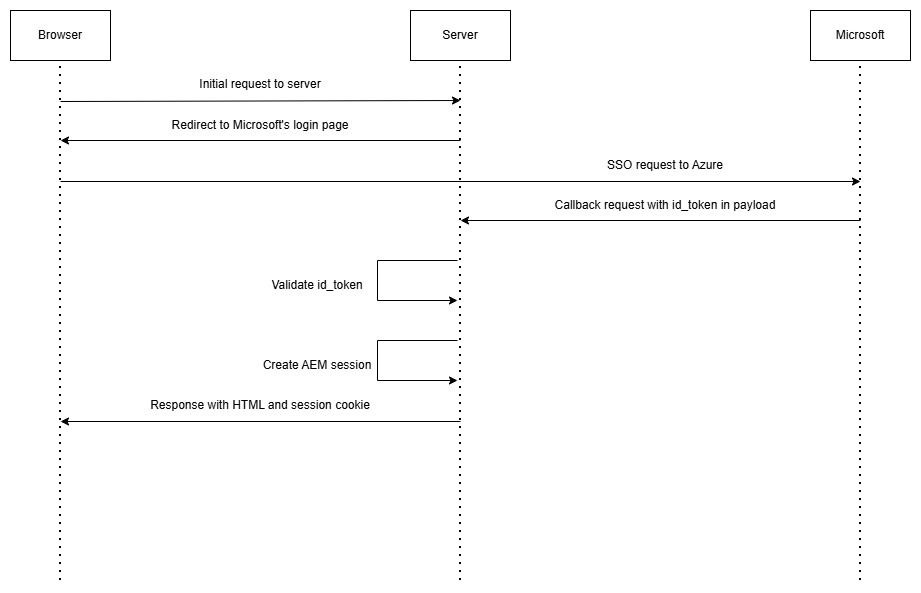
This id_token in request is the main reason why it’s not recommended approach as it can be intercepted easily and user’s information and can be misused.
Scenario 2
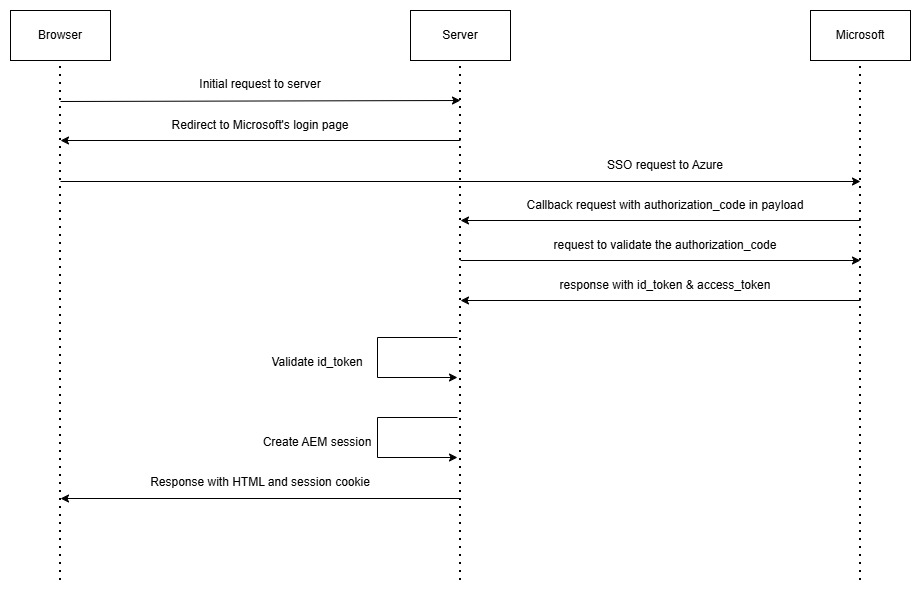
Authorization code based authentication.
- User accessing site with no valid authentication are the page re-directed to Azure (Microsoft) login page.
- Call back received in AEM servlet, with authorization code in request.
- This authorization code are validated again by call to Azure from backend, to retrieve id_token and access_token using client secret.
- Rest is same as above – id_token is in JWT format which contains payload like email, name, role etc.
- id_token gets validated for signature and expiry.
- Once validated, AEM session is created.
- For subsequent calls, AEM session will be used.
Scenario 3
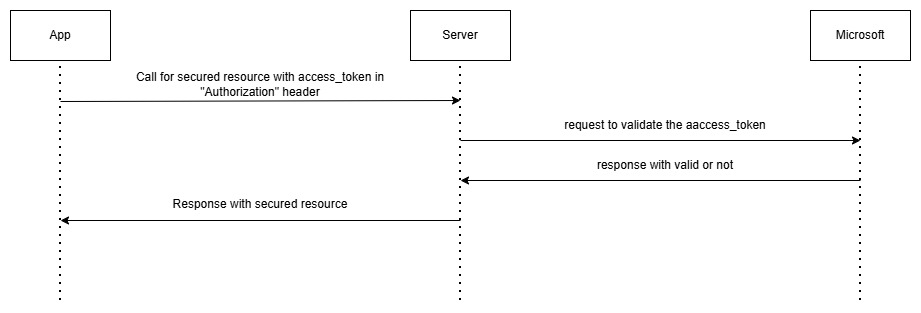
This scenario is specially added to mobile apps, where app is already logged in and have access_token from Azure. App can directly retrieve any secured resource from AEM server by using access_token in “Authorization” request header.
- The request for secured resource will received by our custom authentication handler.
- Header will be checked for “Authorization” header.
- If present, access_token will extracted and sent to Azure for verification.
- Upon successful verification, request will be passed as authenticated one.
Sample code for all these scenarios in single implementation:
Custom OIDC Based AuthenticationHandler
@Component(service = {CustomOidcAuthenticationHandler.class, AuthenticationHandler.class}, immediate = true,
        property = {"authtype=mySite", "sling.auth.requirements=-/bin/security/login", Constants.SERVICE_RANKING + ":Integer=50000"})
@ServiceDescription(CustomOidcAuthenticationHandler.LABEL)
@Designate(ocd = CustomOidcAuthenticationHandlerConfiguration.class)
public class CustomOidcAuthenticationHandler extends DefaultAuthenticationFeedbackHandler implements AuthenticationHandler {

    @Reference
	HttpClientBuilderFactory httpClientBuilderFactory;

    @Reference
    HttpService httpService; //my custom service to make http calls

    static final String LABEL = "Custom OIDC Authentication Handler";

    /**
     * Request attribute for storing Custom authentication info.
     */
    public static final String SA_CUSTOM_OIDC_AUTHENTICATIONINFO =
            CustomOidcAuthenticationHandler.class.getName() + "_authenticationinfo";

    //class attributes for configuration properties
    private String graphApiProfile;
    private String azureLoginTenant;
    private static String clientID;
    private static String clientSecret;

    @Activate
    protected final void activate(CustomOidcAuthenticationHandlerConfiguration config) {
        configure(config);
    }

    @Modified
    protected final void modified(CustomOidcAuthenticationHandlerConfiguration config) {
        configure(config);
    }

    private void configure(CustomOidcAuthenticationHandlerConfiguration config){
        // here you can read config and add to class variables
    }

    @Override
    public final AuthenticationInfo extractCredentials(HttpServletRequest request, HttpServletResponse response) {
        final String requestURI = request.getRequestURI().toString();

        if(requestURI.equalsIgnoreCase(Constants.OIDC_LOGIN_SERVLET_PATH)){
        	//request is for OIDC Login Redirect. Allowing the request for anonymous access
        	return null;
        }

        //handling mobile app scenario where access token is sent in Authorization header
        if(request.getHeader(HttpHeaders.AUTHORIZATION) != null){
            //Initializing initial handshake for API based call with Request header Authorization
            String authorization = request.getHeader(HttpHeaders.AUTHORIZATION);
            String accessToken = authorization.replace(Constants.BEARER, "");
            try{
                OIDCToken oidcToken = new OIDCToken(accessToken ,httpClientBuilderFactory);
                if(oidcToken.isValid() && validateAccessToken(accessToken)){
                    //Access token is valid, Allowing the request
                    return null;
                }
            } catch (Exception ex) {
                //report error and proceed with other scenario for authorization
            }
        }

        //Proceeding with other scenario for authorization
        AuthenticationInfo authInfo = (AuthenticationInfo) request.getSession().getAttribute(SA_CUSTOM_OIDC_AUTHENTICATIONINFO);
        if(authInfo != null){
            //Authentication succeed
            return (AuthenticationInfo) authInfo.clone();
        }
        return AuthenticationInfo.FAIL_AUTH;
    }

    @Override
    public final void authenticationFailed(HttpServletRequest request, HttpServletResponse response,
                                           AuthenticationInfo authInfo) {
        // clear authentication data from Cookie or Http Session
        dropCredentials(request, response);
    }

    @Override
    public final boolean authenticationSucceeded(HttpServletRequest request, HttpServletResponse response,
                                                 AuthenticationInfo authInfo) {
        return handleRedirect(request, response);
    }

    /**
     * This method is called when no credentials could be extracted in the request and the client must
     * login.
     *
     * @return true if the request for login is done. otherwise false.
     */
    @Override
    public final boolean requestCredentials(HttpServletRequest request, HttpServletResponse response)
            throws IOException {
        // Send the user to login page
        String oidcLoginUrl = getOidcLoginRedirectUrl();
        if (StringUtils.isNotBlank(oidcLoginUrl)) {
            response.sendRedirect(oidcLoginUrl);
            return true;
        }
        return false;
    }

    @Override
    public final void dropCredentials(HttpServletRequest request, HttpServletResponse pResponse) {
        request.getSession().removeAttribute(SA_CUSTOM_OIDC_AUTHENTICATIONINFO);
    }

    public static String getOidcLoginRedirectUrl() {
    	String requestUrl=azureLoginTenant;
        // add query parameters like client_id, response_type, redirect_uri, scope, response_mode, state, nonce, code_challenge, code challenge method
        // where redirect_uri is the redirect login servlet path - Constants.OIDC_LOGIN_SERVLET_PATH
        return requestUrl;
    }

    private boolean validateAccessToken(String accessToken) {
        OIDCToken oidcToken = new OIDCToken(accessToken ,httpClientBuilderFactory);
		JsonObject json = httpService.getRequestJson(graphApiProfile, accessToken);
        if(json != null && json.has("id") && json.get("id").getAsString().equals(oidcToken.getObjectId())){
            return true;
        }
	return false;
	}
}
Servlet to handle Azure’s redirect callbacks
@Component(immediate = true, service = Servlet.class, property = {
    "sling.servlet.paths=" + Constants.OIDC_LOGIN_SERVLET_PATH,
    "sling.servlet.methods=POST"
})
public class OidcLoginRedirectServlet extends SlingAllMethodsServlet {

    @Reference
    private transient HttpClientBuilderFactory httpClientBuilderFactory;

    @Override
    protected final void doGet(SlingHttpServletRequest request, SlingHttpServletResponse pResponse)
    throws ServletException, IOException {
        doPost(request, pResponse);
    }

    @Override
    protected void doPost(final SlingHttpServletRequest req,
        final SlingHttpServletResponse resp) throws ServletException, IOException {
        try {
			if(req.getParameter("id_token") != null && StringUtils.isNotEmpty(req.getParameter("id_token"))){
				handleRequestWithIdToken(req, resp);
			}else if (req.getParameter("code") != null && StringUtils.isNotEmpty(req.getParameter("code"))){
				handleRequestWithCode(req, resp);
			}
		} catch (Exception e) {
			//Handle exception
		}
        resp.sendRedirect("/");
    }

	/**
     * To handle the request in case id_token is present in the request parameter
     */
	private void handleRequestWithIdToken(final SlingHttpServletRequest req, final SlingHttpServletResponse resp){
		String idToken = req.getParameter("id_token");
		OIDCToken oidcToken = new OIDCToken(idToken,httpClientBuilderFactory);
		if(oidcToken.isValid() && oidcToken.hasValidSignature()) {
			AuthenticationInfo authInfo = OidcUtil.authenticateUser(oidcToken.getEmail());
			if(authInfo != null){
				req.getSession().setAttribute(CustomOidcAuthenticationHandler.SA_CUSTOM_OIDC_AUTHENTICATIONINFO, authInfo);
				//Setting status OK
                return;
			}
		}
        //Setting status UNAUTHORIZED
        resp.setStatus(HttpServletResponse.SC_UNAUTHORIZED);
	}

	/**
     * To handle the request in case authorization code is present in the request parameter
     */
	private void handleRequestWithCode(final SlingHttpServletRequest req, final SlingHttpServletResponse resp){
		JsonObject json = getIdTokenFromCode(req.getParameter("code"));
		if(json != null){
			String idToken = json.get("id_token").getAsString();
			OIDCToken oidcToken = new OIDCToken(idToken ,httpClientBuilderFactory);
			if(oidcToken.isValid() && oidcToken.hasValidSignature() && json.has("access_token")) {
				AuthenticationInfo authInfo = OidcUtil.authenticateUser(oidcToken.getEmail());
				if(authInfo != null){
					req.getSession().setAttribute(CustomOidcAuthenticationHandler.SA_CUSTOM_OIDC_AUTHENTICATIONINFO, authInfo);
					//Setting status OK
					resp.setStatus(HttpServletResponse.SC_OK);
                    return;
				}
			}
		}
        //Setting status UNAUTHORIZED
        resp.setStatus(HttpServletResponse.SC_UNAUTHORIZED);
	}

    /**
     * To validate authorization code and retrieve access token and id token from microsoft
     */
	private JsonObject getIdTokenFromCode(String code, boolean isOnenewsRequest) {
		CloseableHttpClient httpClient = null;
		JsonObject json = null;
		HttpPost httppost = new HttpPost("https://login.microsoftonline.com/<tenant_id>/oauth2/v2.0/token");
		try {
			String clientId = <client_id>;
			String clientSecret = <client_secret>;
			String authString = clientId + ":" + clientSecret;
			String base64Credentials = Base64.getEncoder().encodeToString(authString.getBytes("utf-8"));
			httppost.addHeader(HttpHeaders.AUTHORIZATION, "Basic " + base64Credentials);
			httpClient = (CloseableHttpClient) httpClientBuilderFactory.newBuilder().build();
			List<NameValuePair> nameValuePairs = new ArrayList<NameValuePair>();
			nameValuePairs.add(new BasicNameValuePair("code", code));
			nameValuePairs.add(new BasicNameValuePair("client_secret", clientSecret));
            // add all required parameters like code_verifier, grant_type etc
			httppost.setEntity(new UrlEncodedFormEntity(nameValuePairs));
			//Sending post request for id token
			CloseableHttpResponse response = (CloseableHttpResponse) httpClient.execute(httppost);
			json = new Gson().fromJson(EntityUtils.toString(response.getEntity()), JsonObject.class);
		} catch (Exception ex) {
			//Handle exception
		}
		return json;
	}

	private  AuthenticationInfo authenticateUser(String email) {
        //find a user (principal) with passed email
        //Create and return a new object of AuthenticationInfo and set user
    }
}
OIDCToken – to handle JWT
public class OIDCToken {

	private JsonObject header;
	private JsonObject payload;

	@Getter
	private String tokenType;
	@Getter
	private String algorithm;
	@Getter
	private String principal;
	@Getter
	private String appId;
	@Getter
	private Calendar expiry;

	private String kid;
	@Getter
	private boolean isValid = false;
	@Getter
	private boolean hasValidSignature = false;

	private static final String TYPE = "typ";
	private static final String ALGORITHM = "alg";
	private static final String PRINCIPAL = "principal";
	private static final String EXPIRATION_TIME = "exp";
	private static final String APP_ID = "appid";
	private static final String KID = "kid";

	private SimpleDateFormat format = new SimpleDateFormat("yyyy-MM-dd hh:mm:ss");

	public static Calendar unixToCalendar(long unixTimeStamp) {
		Calendar calendar = Calendar.getInstance();
		calendar.setTimeInMillis(unixTimeStamp * 1000);
		return calendar;
	}

	public static JsonObject parseJSONResponse(String response) {
		return new Gson().fromJson(response, JsonObject.class);
	}

	public static JsonObject discoverKeys(HttpClientBuilderFactory httpClientBuilderFactory) throws IOException {

		JsonObject discoveryKeysJson = new JsonObject();
		CloseableHttpClient httpClient = null;
		CloseableHttpResponse response = null;
		final HttpGet request = new HttpGet("https://login.microsoftonline.com/<tenant_id>/discovery/v2.0/keys");
		try {
			httpClient = (CloseableHttpClient) httpClientBuilderFactory.newBuilder().build();
			response = (CloseableHttpResponse) httpClient.execute(request);
			if (response != null) {
				final int statusCode = response.getStatusLine().getStatusCode();
				HttpEntity responseentity = response.getEntity();
				String responseContent = EntityUtils.toString(responseentity);
				if (statusCode == HttpStatus.SC_OK) {
					discoveryKeysJson = parseJSONResponse(responseContent);
				}
			}
		} catch (IOException e) {
			//handle exception
		} finally {
			//cloding connections
		}
		return discoveryKeysJson;

	}

	static String findPublicKey(JsonObject jsonObject, String kid) {
		String publicKey = "";
		JsonArray keysArray = jsonObject.get("keys").getAsJsonArray();
		for (int i = 0; i < keysArray.size(); i++) {
			JsonObject keysObject = keysArray.get(i).getAsJsonObject();
			if (keysObject.has("kid") && keysObject.get("kid").getAsString().equalsIgnoreCase(kid)) {
				JsonArray x5cArray = keysObject.get("x5c").getAsJsonArray();
				{
					publicKey = x5cArray.get(0).getAsString();
				}
			}
		}
		return publicKey;
	}

	static boolean verifySignature(String oidctoken, String publicKey) {
		boolean signatureVerified = false;
		SignedJWT signedJWT;
		try {
			byte[] decodedCertificate = Base64.getDecoder().decode(publicKey);
			CertificateFactory certFact = CertificateFactory.getInstance("X.509");
			X509Certificate cer = (X509Certificate) certFact
					.generateCertificate(new ByteArrayInputStream(decodedCertificate));
			signedJWT = SignedJWT.parse(oidctoken);
			JWSVerifier verifier = new RSASSAVerifier((RSAPublicKey) cer.getPublicKey());
			signatureVerified = signedJWT.verify(verifier);
		} catch (Exception e) {
			//handle exception
		}
		return signatureVerified;
	}

	public OIDCToken(String token, HttpClientBuilderFactory httpClientBuilderFactory) {
		String[] chunks = token.split("\\.");
		if (chunks.length < 3) {
			return;
		}
		Base64.Decoder decoder = Base64.getDecoder();
		this.header = new Gson().fromJson(new String(decoder.decode(chunks[0]), StandardCharsets.UTF_8), JsonObject.class);
		this.payload = new Gson().fromJson(new String(decoder.decode(chunks[1]), StandardCharsets.UTF_8), JsonObject.class);
		if (header.has(TYPE)) {
			this.tokenType = header.get(TYPE).getAsString();
		}
		if (header.has(ALGORITHM)) {
			this.algorithm = header.get(ALGORITHM).getAsString();
		}
		if (payload.has(PRICIPAL)) {
			this.princial = payload.get(PRICIPAL).getAsString();
		}
		if (payload.has(EXPIRATION_TIME)) {
			this.expiry = unixToCalendar(payload.get(EXPIRATION_TIME).getAsLong());
		}
		if (payload.has(EXPIRATION_TIME)) {
			this.kid = unixToCalendar(payload.get(EXPIRATION_TIME).getAsLong());
		}
		if (payload.has(APP_ID)) {
			this.appId = payload.get(APP_ID).getAsString();
		}
		if (header.has(KID)) {
			this.kid = header.get(KID).getAsString();
		}

		Calendar now = Calendar.getInstance();
		if (now.before(expiry) &&
			(this.appId != null && (this.appId.equalsIgnoreCase(<lient_id>)))) {
			this.isValid = true;
		}

		JsonObject keyDiscoveryJson = null;
		String publicKey = "";
		try {
			keyDiscoveryJson = discoverKeys(httpClientBuilderFactory);
			publicKey = findPublicKey(keyDiscoveryJson, this.kid);
		} catch (IOException e) {
			//handle exception
		}
		if (StringUtils.isNotEmpty(publicKey)) {
			this.hasValidSignature = verifySignature(token, publicKey);
		}
	}
}