AEM MSM: Multilingual & Multichannel with Custom Rollout
1) What is MSM and why it matters
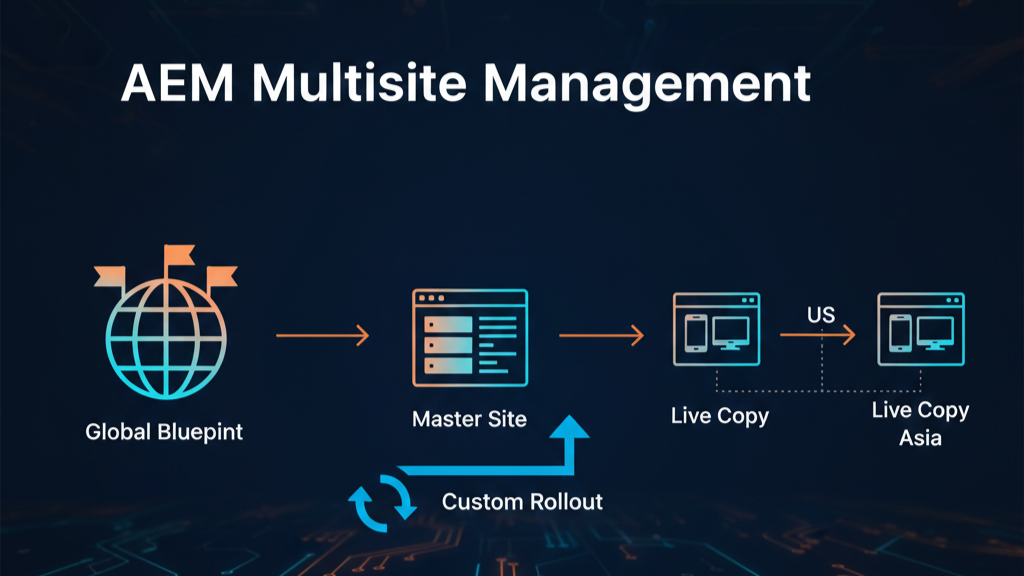
AEM Multi‑Site Manager (MSM) lets you build a single source (a Blueprint) and produce multiple Live Copies for different markets, regions, brands, or channels. You gain centralized control over structure and shared content, while still allowing local teams to make controlled changes.
Typical goals you can achieve:
- Multilingual delivery using i18n dictionaries and language copies.
- Multichannel delivery by reusing a single blueprint structure for web, app, kiosk, or partner sites.
- Controlled synchronization using MSM rollout configurations and triggers.
2) Multilingual (i18n) + Multichannel (Blueprint → LiveCopy)
Multilingual with i18n
- Maintain /apps/ or /etc/ i18n dictionaries (depending on your project archetype) for translatable keys and locale variants.
- For page content, create Language Copies (e.g., /content/site/en, /content/site/fr, /content/site/de) and let MSM govern structure and shared components.
- Use AEM Translation Integration (connectors or manual) for content translation while MSM keeps layout/structure aligned.
Multichannel with Blueprints
Build a Blueprint (for example /content/site/blueprint) that contains:
- Common information architecture (navigation tree)
- Core components
- Default experience fragments, templates, and policies
Create Live Copies from the blueprint for each channel and region, e.g.:
- /content/site/web/en (primary web)
- /content/site/web/fr (web France)
- /content/site/app/en (in‑app webview channel)
- /content/site/partner/apac (partner microsite)
Each Live Copy inherits from the blueprint and can receive rollouts on demand.
3) LiveCopy from Blueprint—how it behaves
- Live Copy stores a reference to its source (the blueprint path or another Live Copy).
- When you roll out from the blueprint, MSM pushes changes to all (or selected) Live Copies according to the rollout configuration attached to the relationship.
Standard Rollout Configuration is often attached by default and is executed when a rollout is triggered. It’s safe to keep it and add your own custom rollout config(s) alongside it.
4) Rollout basics and triggers
MSM rollouts can be manual or automatic. You can combine multiple rollout configs and decide when they should run.
Built‑in rollout triggers:
- On Rollout\ Triggered when a user presses Rollout on the blueprint page (or Synchronize on a Live Copy).
- On Modification\ Fires when the source (blueprint) content changes and the relationship is configured to automatically sync.
- On Activation\ Fires when the source is activated (published).
- On Deactivation\ Fires when the source is deactivated.
You can attach multiple triggers to a rollout config; real‑world setups commonly use On Rollout + On Activation for predictable behavior.
5) What is included/excluded in Live Sync
During synchronization, MSM excludes several node types and properties by default to protect local authoring, security, or runtime metadata. These exclusions are defined in OSGi configuration for the CQ MSM Content Update Action (a default live action). You can override or extend this via OSGi if needed.
Keep these defaults unless you have a strong reason—loosening exclusions can cause surprising overrides of local edits.
6) About the Activate/Deactivate on Blueprint rollout configs
- “Activate on blueprint” and “Deactivate on blueprint” rollout configs only trigger activation/deactivation of the Live Copies.
- They do not re-roll out (re-synchronize) content.
- Use them when you want publishing state to mirror the blueprint but not necessarily content updates at that moment.
7) Creating a Custom Rollout Configuration (example: region‑specific URL rewrite)
Use case: At rollout time, you want to transform content for a region or sub‑domain—for instance:
- Rewrite links from https://www.example.com → https://fr.example.com
- Swap a market‑specific asset path
- Stamp locale‑aware metadata
This is done with a custom LiveAction (Java) + a custom rollout config (XML).
LiveAction & ActionFactory (Java)
You implement two classes:
- LiveAction: the logic that runs during rollout.
- ActionFactory: registers your action with MSM so it can be referenced by rollout configs.
@Component(service = LiveActionFactory.class, immediate = true, property={
LiveActionFactory.LIVE_ACTION_NAME + "=" + RegionUrlRewriteActionFactory .LIVE_ACTION_NAME})
public class RegionUrlRewriteActionFactory extends BaseActionFactory<BaseAction> {

	// The name used inside rollout configs to refer to this Action
	public static final String ACTIONNAME = "regionUrlRewrite";

	@Override
	public String createsAction() {
    	return ACTIONNAME;
	}

	@Override
	public RegionUrlRewriteAction newActionInstance() {
    	return new RegionUrlRewriteAction();
	}

	public static class RegionUrlRewriteAction extends BaseAction {
	@Override
	protected boolean handles(final Resource source, final Resource target, final LiveRelationship liveRelationship,
			final boolean resetRollout) throws RepositoryException {
		//return boolean after checking condition like content hierarchy for which the Action is valid
	}


	@Override
	protected void doExecute(final Resource source, final Resource target, final LiveRelationship liveRelationship,
			final boolean resetRollout) throws RepositoryException {
		// check the source resource and manipulate the target resource as per your requirement
	}
}
BaseAction implements LiveAction & BaseActionFactory implements LiveActionFactory, they provide basic override for us to work on.
Rollout configuration (XML)
Next, define a rollout config under your project (e.g., /apps/<project>/msm/rolloutconfigs, or /etc/msm/rolloutconfigs then deploy via your content package).\ Below is a minimal example that includes your custom action and reuses existing live actions like the standard content update.
<?xml version="1.0" encoding="UTF-8"?>
<myRolloutConfig
	jcr:primaryType="cq:Page"
	jcr:content="[nt:unstructured]"
	xmlns:jcr="http://www.jcp.org/jcr/1.0">
	<jcr:content
        cq:defaultView="html"
        cq:template="/libs/wcm/msm/templates/rolloutconfig"
        cq:trigger="rollout"
        jcr:primaryType="nt:unstructured"
        jcr:title="My Rollout Action"
        sling:resourceType="wcm/msm/components/rolloutconfig">
		<contentUpdate
			jcr:primaryType="cq:LiveSyncAction"/>
		<regionUrlRewrite
			jcr:primaryType="cq:LiveSyncAction"/>
    </jcr:content>
</myRolloutConfig>- jcr:title — display name.
- cq:trigger — comma‑separated triggers; e.g. ON_ROLLOUT, ON_MODIFICATION, ON_ACTIVATION, ON_DEACTIVATION.
- Each child node adds an action with jcr:primaryType=”cq:LiveSyncAction”—this must match createsAction() from your factory
You can copy existing rollout configs (like the Standard Rollout Config) into your app path, then modify or append your custom action so you don’t lose the stock behavior you rely on.
Deployment & usage
1. Build & Deploy
- Include the OSGi bundle (with your ActionFactory + LiveAction) in your application.
- Include the rolloutconfig XML in your content package (apps) and deploy.
2. Attach the rollout config
When creating a Live Copy (or editing Live Copy Configuration), select multiple rollout configs:
- Keep Standard Rollout Config (for baseline actions).
- Add your Custom Region URL Rewrite.
3. Trigger a rollout
- From the Blueprint: select the root or a subtree and click Rollout.
- Or, from Live Copy: click Synchronize.
- If you chose automatic triggers (e.g., On Activation), publishing the source will also call your custom action.
4. Observe the results
- After rollout, your action runs and transforms content (e.g., regional URL rewrites).
- Validate changes in the repository and via the page editor.
- If needed, refine exclusions or your action’s logic.
Operational considerations & best practices
- Keep exclusions sane\ Respect the default CQ MSM Content Update Action exclusions to avoid clobbering local market edits. Only loosen them if you must, and document it.
- Idempotency\ Make your action idempotent (safe to run multiple times) to handle repeated rollouts without producing broken links or duplicate changes.
- Performance\ Limit deep subtree scans; target only nodes you need. Consider batching or using ResourceResolver carefully to avoid performance issues.
- Testing\ Use AEM Mocks for unit tests and a pre‑prod live copy to validate transforms before going to production.
- Publishing behavior\ Remember: Activate/Deactivate on blueprint configs only mirror the publish state—they don’t re‑roll the content. Combine them with content actions if you want both state + content to change together.
Wrap-up
With MSM, you can design once and deliver many times—across languages and channels—while keeping a predictable synchronization model. When the out‑of‑the‑box actions don’t cover your needs, a custom rollout config with a LiveAction gives you a safe, repeatable hook to transform content at rollout time (e.g., region‑specific URLs, sub‑domain rewrites, asset swaps), all without sacrificing the governance MSM provides.




Post Comment