

 Ashish Sharma
Modern cloud platforms demand storage solutions that can scale seamlessly to petabytes and exabytes. Traditional file systems and disk-attached block storage often crumble under the weight of billions of unstructured files. Consequently, object storage has become the undisputed backbone of modern cloud-native architectures.
Whether you stream videos on YouTube, run machine learning training pipelines, or archive petabytes of compliance logs, object storage provides the durability, scalability, and cost efficiency that distributed applications require.
What Is Object Storage?
Unlike traditional systems that organize data into nested directories or raw disk sectors, object storage stores data as discrete, self-contained units called objects.
Every object packages three vital elements together:
- The Payload (Data): The actual file content, such as a video, image, compressed log bundle, or machine learning model checkpoint.
- A Unique Identifier (Key): A 128-bit or string-based key that pinpoints the object inside a flat namespace.
- Rich Metadata: Customizable key-value pairs that describe content type, ownership, retention constraints, security tags, and application context.
Because object storage eliminates hierarchical folders and volume mounting, it scales horizontally across thousands of physical servers. As a result, systems easily distribute, replicate, and manage billions of objects across multiple availability zones.
+----------------------------------------------------------------+
|                         OBJECT STRUCTURE                       |
+----------------------------------------------------------------+
|  [Unique Key / ID]    e.g., "videos/2026/user_987/master.mp4"  |
+----------------------------------------------------------------+
|  [Rich Metadata]      ContentType: video/mp4                   |
|                       OwnerId: usr_987                         |
|                       RetentionPolicy: 7-years                 |
|                       Classification: Restricted               |
+----------------------------------------------------------------+
|  [Data Payload]       Raw binary stream (Bytes)                |
+----------------------------------------------------------------+
Core Concepts: The Three Pillars
Every cloud architect must master three fundamental concepts when working with object storage:
- Objects: The fundamental atomic building block. Because objects bind metadata and payload into a single package, applications can inspect, automate, and route data without parsing the underlying payload.
- Buckets (or Containers): Logical top-level namespaces that hold objects. Buckets do not enforce directory depth limits; instead, they provide isolation boundaries for IAM security policies, monitoring, and billing.
- Metadata: The secret weapon of object storage. While standard file systems store rudimentary timestamps and permissions, object storage allows engineers to attach rich business context. Consequently, indexing engines and lifecycle automations can query metadata directly to govern data lifecycles.
Object Storage vs. File Storage vs. Block Storage
Selecting the correct storage tier requires understanding how these paradigms contrast:
| Storage Type | Data Organization | Primary Access Method | Latency | Ideal Workload |
|---|---|---|---|---|
| Object Storage | Flat namespace with buckets and keys | RESTful APIs (HTTP GET, PUT, DELETE) | Medium (~tens of ms) | Unstructured data, media, backups, data lakes |
| Block Storage | Fixed-sized disk blocks (no metadata) | Low-level storage protocols (iSCSI, NVMe-oF) | Ultra-low (< 1–5 ms) | Relational databases (OLTP), virtual machine boot drives |
| File Storage | Hierarchical directory tree (folders/files) | Network protocols (NFS, SMB) | Low (single-digit ms) | Shared enterprise workspaces, legacy application migrations |
Leading Object Storage Platforms
Engineering teams select platforms based on ecosystem affinity, operational requirements, and compliance mandates.
Public Cloud Benchmarks
- Amazon S3 (Simple Storage Service): The pioneer that defined the cloud storage industry. S3 offers near-infinite elasticity, 99.999999999% (11 9s) of durability, and the de facto standard REST API.
- Google Cloud Storage (GCS): Delivers unified storage APIs across global regions and integrates deeply with Google’s BigQuery, Vertex AI, and analytics pipelines.
- Azure Blob Storage: The ideal choice for Microsoft-centric environments. It integrates natively with Active Directory, .NET stacks, Azure Synapse, and enterprise governance tools.
On-Premises & Hybrid Solutions
- MinIO: A high-performance, Kubernetes-native, S3-compatible object store. Organizations deploy MinIO to retain full data sovereignty while using familiar S3 APIs.
- Ceph: A distributed, open-source storage platform that delivers unified object, block, and file storage on commodity hardware in private data centers.
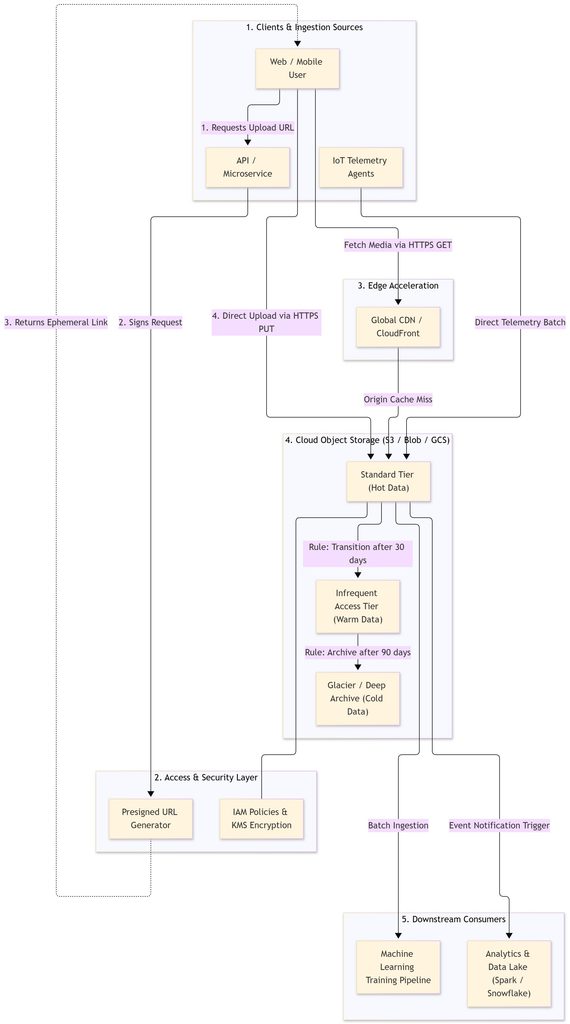
Architectural Diagram: Modern Cloud Ingestion & Lifecycle
The following diagram illustrates how modern architectures leverage object storage for secure uploads, edge delivery, downstream processing, and tiered archival:
Real-World System Design Scenarios & Use Cases
Scenario A: Large-Scale Video Hosting (YouTube-Style Platform)
- Direct-to-Storage Uploads: Instead of routing multi-gigabyte video files through application servers, the backend issues an ephemeral presigned URL. The client browser then uploads the raw binary stream directly to object storage via HTTP
PUT. - Adaptive Bitrate Streaming: Transcoding workers read the raw video, segment it into multiple resolutions (1080p, 720p, 480p), and write HLS/DASH fragments back into the bucket.
- CDN Acceleration: A Content Delivery Network (e.g., CloudFront, Fastly) caches popular video chunks at edge locations worldwide, drastically reducing latency and egress bandwidth costs.
Scenario B: Cost-Efficient Log Ingestion & Data Lakes (Petabyte Scale)
- Raw Landing Zone: Microservices flush compressed JSON or Parquet logs into standard object storage buckets.
- Automated Tiering Policies: To optimize budgets, architects configure automated lifecycle rules:
- Day 0–30: Logs remain in Standard Tier for active debugging and ingestion by querying engines.
- Day 30–90: Objects move to Infrequent Access (IA), cutting storage costs by up to 50%.
- Day 90+: Objects migrate to Deep Archive (Glacier) for regulatory compliance at fractional costs.
- Immutability (Object Lock): Security teams enable WORM (Write Once, Read Many) policies to protect compliance logs from ransomware and accidental deletion.
Scenario C: Secure Inter-Service File Sharing in Microservices
- Zero Shared Disk Dependencies: Microservices communicate over isolated networks without sharing network file mounts.
- Decoupled Exchange: Service A drops large generated reports into an encrypted bucket and generates a presigned
GETlink with a 15-minute expiration window. - Least Privilege: Service B consumes the data using the temporary signed URL. This eliminates custom file-sharing microservices and keeps application pods completely stateless.
Scenario D: IoT Telemetry & AI/ML Data Lakes
- Massive Concurrency: Millions of connected IoT devices push time-series dumps into object storage.
- Landing Zone for AI Training: Distributed frameworks (e.g., PyTorch, TensorFlow) stream training sets directly from object storage buckets using parallelized worker threads.
Scenario E: Static Website Hosting
- Serverless Frontends: Cloud providers can serve static assets (HTML, CSS, JavaScript, WebAssembly) directly over HTTP from a public bucket.
- Zero Infrastructure Overhead: Developers host documentation sites, portfolios, and single-page apps (SPAs) without provisioning or patching virtual web servers.
Critical Trade-offs & Engineering Considerations
Although object storage delivers virtually unlimited scale, architects must weigh several trade-offs:
Latency vs. Throughput
Object storage runs over HTTP REST APIs. As a result, first-byte latency typically ranges from 10 to 50 milliseconds. Therefore, never use object storage for real-time transactional databases (OLTP) that demand sub-millisecond random I/O. However, object storage excels at aggregate throughput, allowing hundreds of workers to read and write data in parallel.
Access Patterns (WORM Model)
Object storage adheres to the Write Once, Read Many (WORM) paradigm. You cannot append bytes to an existing object or edit a file in-place; you must rewrite the entire object. Consequently, file systems or databases remain superior for append-heavy or frequent-mutation workloads.
Consistency Semantics
Historically, object stores relied on eventual consistency for overwrites. While modern engines (like Amazon S3) now guarantee strong read-after-write consistency for PUT and DELETE requests, architects working with distributed on-prem platforms (e.g., Ceph) must verify replication semantics to avoid reading stale data.
Cost Traps: Beyond Storage Capacity
Naive designs can create unexpected cloud bills. Remember that providers bill for:
- API Requests: High-frequency
PUT,LIST, andGETcalls can exceed storage capacity fees if clients make thousands of micro-requests instead of batching. - Data Retrieval Fees: Cheaper cold tiers (e.g., Glacier) levy substantial retrieval fees per gigabyte.
- Egress Bandwidth: Moving data out of cloud provider regions to external networks incurs steep network charges. Placing caching layers (CDNs) in front of object storage mitigates this expense.
Summary & Key Takeaways
Object storage has fundamentally transformed modern infrastructure design. By bundling data, unique identifiers, and rich metadata into a flat namespace, it removes the physical constraints of traditional storage hierarchies.
- Choose object storage whenever your workload involves large volumes of unstructured data, static media, automated backups, or analytics pipelines.
- Avoid object storage for transactional databases or sub-millisecond random write operations.
- Implement automated lifecycle rules and presigned URLs early in your design phase to balance performance, security, and cost.