

 Ashish Sharma
Every application relies on storage, yet the way systems store and retrieve data has shifted dramatically over the past two decades. Modern data-intensive applications—ranging from streaming platforms to machine learning pipelines—process petabytes of incoming records every day. A single hard drive or traditional server simply cannot handle this volume.
To overcome these constraints, engineers transitioned from isolated local storage to distributed file systems (DFS). This article explores how storage architecture evolved, examines the mechanics of distributed replication, compares popular enterprise storage solutions, and highlights essential design trade-offs.
What Is a Traditional File System?
At its core, a storage drive is merely a vast sequence of raw blocks. Without a coordinating layer, an operating system cannot identify file boundaries, folder hierarchies, permissions, or timestamps.
A file system provides this vital organizational structure. It manages metadata, maps human-readable directory trees to physical sectors, and enforces security access controls.
+-------------------------------------------------------+
|                     Applications                      |
+-------------------------------------------------------+
                           |
                           v
+-------------------------------------------------------+
|           Operating System / File System Layer        |
|        (Directory Tree, Inodes, Access Control)       |
+-------------------------------------------------------+
                           |
                           v
+-------------------------------------------------------+
|             Physical Disk (Raw Sectors/Blocks)        |
+-------------------------------------------------------+
Popular File System Options
- ext4 (Linux): The default workhorse for Linux environments, delivering dependable daily performance and robust journaling.
- NTFS (Windows): The enterprise standard for Windows systems, featuring advanced access control lists (ACLs) and encryption support.
- XFS (High-Performance Linux): An allocation-group-based file system optimized for parallel I/O, large files, and high-throughput server workloads.
The Single-Node Bottleneck
Traditional file systems function exceptionally well on workstations, laptops, and isolated utility servers because their simplicity keeps overhead minimal. However, severe challenges arise as soon as workloads scale.
Because traditional file systems reside on a single physical machine, that machine’s hardware imposes strict ceilings:
- Capacity Limits: When the drive fills up, administrators must manually attach larger disks.
- I/O Bottlenecks: A single storage controller can only satisfy a finite number of read/write operations per second (IOPS).
- Single Point of Failure (SPOF): If the motherboard, disk controller, or drive fails, the entire application halts until someone repairs the hardware.
Scaling a traditional system demands vertical scaling (buying larger, more expensive hardware). Eventually, organizations hit a physical and financial wall. Consequently, large-scale systems required a new paradigm: horizontal scaling across interconnected computers.
The Distributed File System (DFS) Paradigm Shift
A distributed file system (DFS) pools the storage capacity of multiple independent servers (nodes) across a network while presenting a unified, single logical namespace to users and applications.
       Logical View (User/Application)
       └── /data/warehouse/logs/2026/events.parquet
                            │
            ┌───────────────┼───────────────┐
            ▼               ▼               ▼
     [Physical Node 1] [Physical Node 2] [Physical Node 3]
Although data physically scatters across dozens or thousands of separate machines, the application accesses files as if they existed on a local folder.
Core Benefits of Distributed Storage
- Horizontal Scalability: Rather than buying expensive proprietary hardware, teams scale storage capacity and network bandwidth simply by plugging commodity servers into the cluster.
- High Availability and Fault Tolerance: Instead of treating hardware failures as catastrophes, distributed systems anticipate frequent disk and node outages. They continuously maintain redundant copies of your data across independent servers.
DFS Architecture: Separating Metadata from Data
To operate reliably, a distributed storage system must solve two challenges simultaneously: track the location of every file fragment and survive hardware failures. Most distributed architectures achieve this by separating metadata management from raw data storage.
The Hadoop Distributed File System (HDFS) serves as the canonical example of this design.
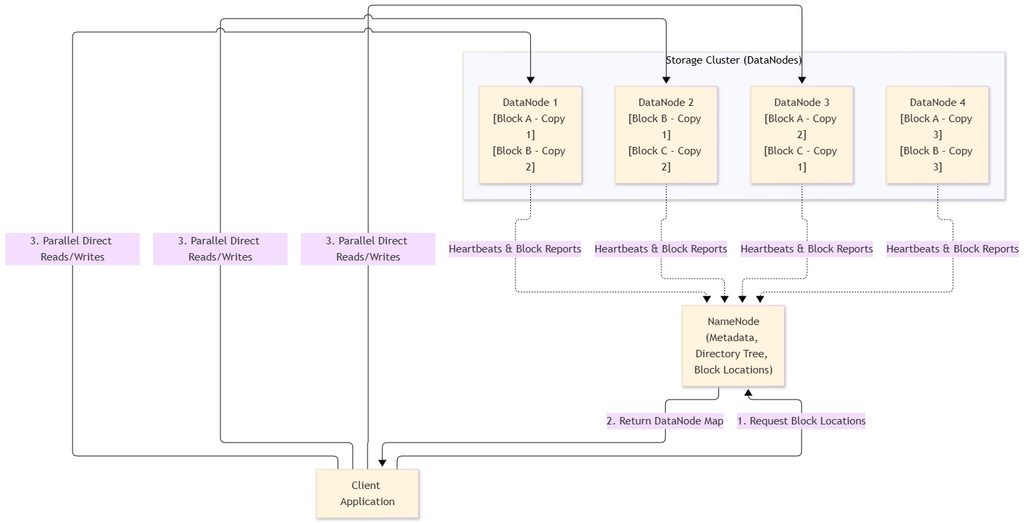
Component Roles
- The Coordinator (NameNode / Metadata Server):
The NameNode stores directory hierarchies, ownership records, access permissions, and the exact mapping of files to individual data blocks. Critically, it never handles actual file payload data, preventing it from becoming a data transfer bottleneck. - The Storage Workhorses (DataNodes / Storage Daemons):
DataNodes store the physical chunks of files on their local drives. Additionally, they send regular “heartbeat” signals and block reports to the NameNode to confirm their operational health.
How Block Distribution and Replication Work
When a client uploads a file into HDFS:
- Block Splitting: The system partitions the file into large, uniform blocks (typically 128 MB or 256 MB).
- Block Scattering: The client writes these blocks across different DataNodes throughout the cluster, enabling concurrent, parallel reads and writes.
- Replication Factor: The system duplicates every block across multiple physical machines according to a configured replication policy (commonly 3x).
- Automatic Healing: If a server abruptly crashes, the NameNode detects the missing heartbeat, identifies the under-replicated blocks, and commands the surviving nodes to create replacement copies elsewhere. As a result, users continue reading data without experiencing downtime.
Comparing Enterprise Distributed File Systems
Not every distributed workload matches HDFS’s design philosophy. Depending on consistency, POSIX compliance, and hardware requirements, architects choose between several leading technologies:
| Feature / Metric | HDFS | CephFS | GlusterFS |
|---|---|---|---|
| Primary Architecture | Centralized Master (NameNode) + Workers | Decoupled CRUSH Algorithm + MDS | Peer-to-Peer algorithmic placement |
| POSIX Compliance | Non-POSIX (Append-only / WORM) | Fully POSIX compliant | Fully POSIX compliant |
| Unified Storage | File only | Unified (Block, Object, & File) | File and Object |
| Primary Workload | Massive batch analytics (Spark, MapReduce) | Cloud platforms (OpenStack, Kubernetes) | Scale-out shared storage, media streaming |
| Metadata Bottleneck | NameNode RAM limits file count | Distributed across dynamic MDS cluster | None (calculated via hash algorithm) |
Use-Case Scenarios
Scenario A: Big Data Batch Processing (HDFS)
- Use Case: A financial institution runs overnight fraud detection algorithms against terabytes of transaction logs using Apache Spark.
- Why HDFS: The workload relies on a Write-Once-Read-Many (WORM) access pattern. Large 128 MB sequential blocks minimize disk seek overhead and optimize read throughput.
Scenario B: Cloud Infrastructure and Container Volumes (CephFS)
- Use Case: An enterprise runs an on-premise OpenStack or Kubernetes private cloud requiring persistent volumes for hundreds of microservices.
- Why CephFS: Ceph provides unified object, block, and POSIX-compliant file storage within a single cluster. Its CRUSH algorithm computes data placement dynamically, eliminating central metadata bottlenecks.
Scenario C: Media Streaming and Simple Shared Storage (GlusterFS)
- Use Case: A digital broadcasting agency needs a shared media repository to ingest high-definition video assets from multiple editing suites.
- Why GlusterFS: GlusterFS installs easily on commodity Linux hardware, stacks cleanly on top of standard ext4 or XFS partitions, and scales without dedicated metadata servers.
Critical Trade-Off: Latency vs. Throughput
When designing or choosing a storage tier, system designers must navigate the fundamental trade-off between latency and throughput:
+-------------------------------------------------------------------------+
|                         System Performance Axis                         |
+-------------------------------------------------------------------------+
|  Low Latency (OLTP)                       High Throughput (Big Data)    |
|  - Small, random reads/writes             - Massive sequential scans    |
|  - Microsecond response times             - Gigabytes per second        |
|  - Traditional / NVMe arrays              - Distributed (HDFS / Ceph)   |
+-------------------------------------------------------------------------+
- Latency represents the elapsed time required to execute a single I/O operation. In distributed systems, network round-trips, metadata coordination, and replication handshakes inevitably inflate latency compared to a local NVMe drive. Consequently, distributed file systems perform poorly for transactional database workloads (like MySQL or PostgreSQL transactional tables) that demand ultra-fast random updates.
- Throughput represents the cumulative volume of data the system reads or writes over a sustained time window. Distributed systems prioritize aggregate throughput. By striping large files into 128 MB blocks and streaming them simultaneously from twenty separate DataNodes, the cluster achieves composite speeds that dwarf any individual server’s physical capabilities.
Strategies for Scaling High-Throughput Analytics
To maximize throughput and prevent bottlenecks in large analytics pipelines, implement these industry best practices:
- Leverage Data Locality: Whenever possible, schedule compute jobs (such as Spark tasks) directly on the physical worker nodes storing the relevant data blocks. Reading data from a local SATA/NVMe bus eliminates saturation of internal top-of-rack switches.
- Adopt Columnar File Formats: Store analytical datasets using Apache Parquet or Apache ORC instead of raw JSON or CSV. Columnar layouts dramatically reduce total disk I/O by fetching only the specific columns referenced in a query.
- Enable Transparent Compression: Compress stored blocks using snappy or zstd algorithms. Because modern CPUs decompress data faster than network cables and hard drives transfer uncompressed bits, compression accelerates end-to-end throughput.
- Prevent Hotspots via Sharding: Ensure your partition keys distribute writes uniformly across the cluster. If an application directs all current writes to a single node, that node becomes a bottleneck, degrading cluster-wide performance.
Summary Checklist
- Choose Traditional File Systems (ext4, NTFS, XFS) when you need minimal latency, low complexity, and your data fits securely on a single server or workstation.
- Choose Distributed Storage (HDFS, CephFS, GlusterFS) when your data volume exceeds single-machine capacities, requires continuous high availability, or demands horizontal scaling.
- Separate Metadata from Storage to unlock linear scalability while ensuring seamless recovery from hardware crashes through automated replication.