

 Ashish Sharma
No money? No problem! Help us pay the cloud hosting bills without opening your wallet—just give
this ad link a click!😉💸
Modern web architectures often distribute services across multiple servers, domains, and cloud environments. For instance, a single-page application might run on https://app.com, while its backend data resides on https://api.com. Consequently, browsers must constantly balance the need for system connectivity with the imperative of user security.
In this article, we will examine how web browsers enforce security boundaries using the Same-Origin Policy (SOP) and Cross-Origin Resource Sharing (CORS), examine real-world use cases, and explore architectural alternatives like reverse proxies and API gateways.
Why Web Security Needs the Same-Origin Policy (SOP)
Web security relies heavily on the Same-Origin Policy (SOP). Introduced by Netscape in 1995, this mechanism prevents scripts running on one origin from accessing or reading sensitive data from another origin.
What Defines an Origin?
A web origin consists of three components: Protocol, Domain (Host), and Port. If any of these three elements differ, the browser classifies the request as “cross-origin.”
| Request URL 1 | Request URL 2 | Same Origin? | Reason |
|---|---|---|---|
https://example.com/page1 | https://example.com/page2 | Yes | Identical protocol, domain, and port. |
http://example.com | https://example.com | No | Different protocol (http vs https). |
https://example.com | https://api.example.com | No | Different subdomain. |
https://example.com:443 | https://example.com:8080 | No | Different port. |
The Threat: Why SOP Exists
Without SOP, a malicious website (https://malicious.com) could execute a script in your browser that fetches data from your online bank (https://mybank.com). Because your browser automatically includes authentication cookies for https://mybank.com, the bank’s servers would authenticate the session, allowing the attacker to retrieve private transaction history or perform unauthorized actions. Therefore, SOP acts as a fundamental defense against Cross-Site Request Forgery (CSRF) and data leaks.
Enter CORS: The Controlled Exception
Although SOP keeps the web secure, modern distributed systems need cross-origin communication. For example, your React application at https://app.com must request API resources from https://api.com.
To solve this dilemma, the W3C created Cross-Origin Resource Sharing (CORS). CORS does not bypass browser security; instead, it establishes a server-controlled negotiation protocol. By using specific HTTP headers, the server explicitly informs the browser which external origins have authorization to access its resources.
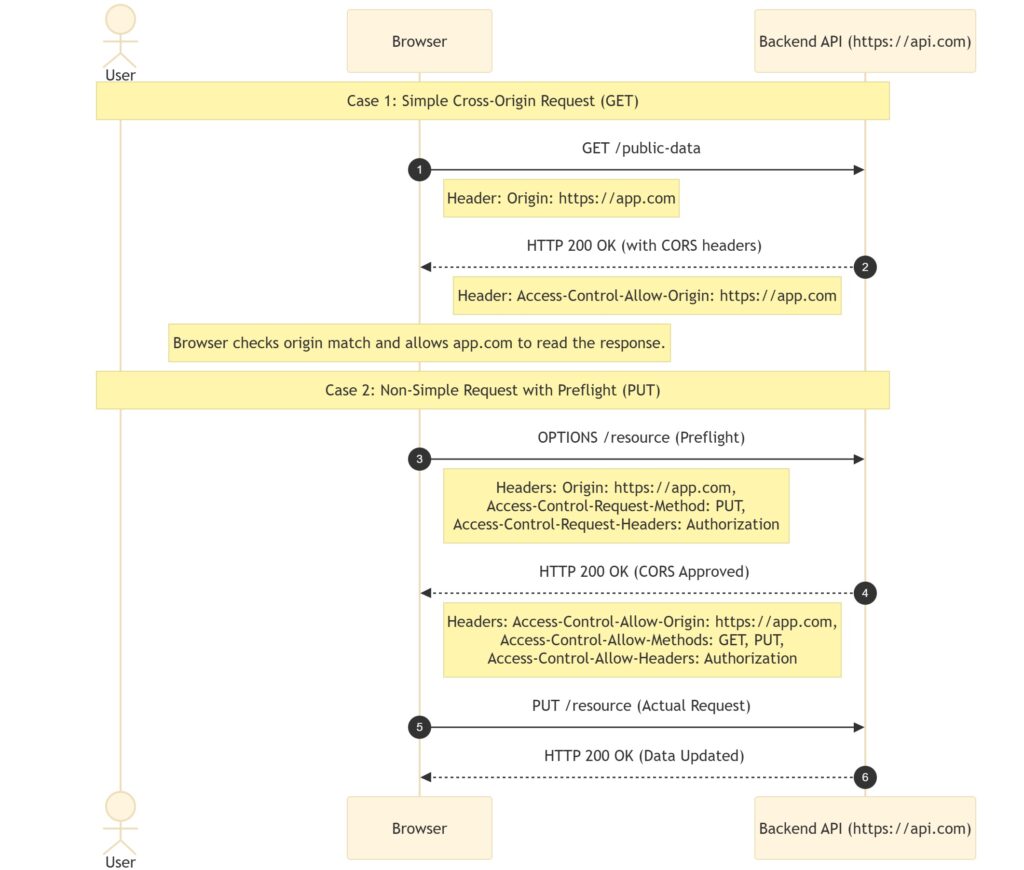
How CORS Works: Simple vs. Preflight Requests
Browsers divide cross-origin requests into two categories depending on the HTTP method, headers, and content type.
A. Simple Requests
When the request performs safe, standard operations, the browser sends the HTTP request directly.
- Trigger Conditions:
- HTTP Method is
GET,POST, orHEAD. - The request contains only browser-managed headers or safe-listed headers (like
Accept,Accept-Language,Content-Language). - The
Content-Typeis strictly restricted toapplication/x-www-form-urlencoded,multipart/form-data, ortext/plain.
- HTTP Method is
- Execution Flow:
- The browser sends the request to the server, including the
Originheader. - The server processes the request and sends the response along with the
Access-Control-Allow-Originheader. - The browser examines the response. If the header matches the requesting origin, it allows client-side javascript to access the data. Otherwise, it blocks access.
- The browser sends the request to the server, including the
B. Preflight Requests
If a request has the potential to modify data or use custom headers, the browser takes a cautious approach. It prevents unsafe requests from hitting the server database before verifying permissions.
- Trigger Conditions:
- Execution Flow:
- The Preflight Handshake: Before sending the actual payload, the browser issues an
OPTIONSrequest. This request contains metadata about the impending action:Origin:https://app.comAccess-Control-Request-Method:PUTAccess-Control-Request-Headers:Authorization
- The Server Contract: The server responds to this preflight check with its CORS security policy:
Access-Control-Allow-Origin:https://app.comAccess-Control-Allow-Methods:GET, POST, PUT, DELETEAccess-Control-Allow-Headers:Content-Type, Authorization
- The Actual Request: If the server’s policy validates the incoming parameters, the browser proceeds to transmit the real
PUTrequest.
- The Preflight Handshake: Before sending the actual payload, the browser issues an
Key CORS Response Headers
To manage this handshake, the server must supply specific headers in its HTTP response:
Access-Control-Allow-Origin: Specifies which external domains can access the resource. For public resources, developers may use*(wildcard). However, for authenticated endpoints, you must specify the exact domain (e.g.,https://trustedpartner.com).Access-Control-Allow-Methods: Lists the permitted HTTP verbs (e.g.,GET, POST, PUT, OPTIONS, DELETE).Access-Control-Allow-Headers: Specifies which custom HTTP headers the client may send in subsequent requests (e.g.,Content-Type, Authorization, X-Requested-With).Access-Control-Allow-Credentials: A boolean value (trueorfalse). When set totrue, it instructs the browser that it may expose cookie data, TLS client certificates, and HTTP authorization headers to the client application.
Implementation Code Examples
Backend engineers must configure CORS correctly on the server layer. Below are standard configurations for Express.js and Nginx.
Configuring CORS in Express.js (Node.js)
In Node.js applications, you can write custom middleware or use the official cors package to assign security headers:
const express = require('express');
const app = express();

// Custom CORS middleware logic
app.use((req, res, next) => {
  // Define trusted origins
  res.setHeader('Access-Control-Allow-Origin', 'https://app.com');

  // Set permitted operations
  res.setHeader('Access-Control-Allow-Methods', 'GET, POST, PUT, DELETE, OPTIONS');

  // Allow credentials and specific custom headers
  res.setHeader('Access-Control-Allow-Headers', 'Content-Type, Authorization');
  res.setHeader('Access-Control-Allow-Credentials', 'true');

  // Handle preflight checks immediately
  if (req.method === 'OPTIONS') {
    return res.sendStatus(204); // No Content
  }

  next();
});

app.get('/api/users', (req, res) => {
  res.json({ message: "Secure user data accessed." });
});

app.listen(3000, () => console.log('Server running on port 3000'));
Configuring CORS in Nginx Configuration
If you wish to handle CORS at the web server layer instead of the application layer, add these rules to your Nginx location block:
server {
    listen 80;
    server_name api.com;

    location / {
        # Define allowed origin
        add_header 'Access-Control-Allow-Origin' 'https://app.com' always;
        add_header 'Access-Control-Allow-Credentials' 'true' always;

        if ($request_method = 'OPTIONS') {
            # Handle Preflight check
            add_header 'Access-Control-Allow-Origin' 'https://app.com' always;
            add_header 'Access-Control-Allow-Methods' 'GET, POST, PUT, DELETE, OPTIONS' always;
            add_header 'Access-Control-Allow-Headers' 'Authorization, Content-Type' always;
            add_header 'Access-Control-Max-Age' 1728000; # 20 days cache
            add_header 'Content-Type' 'text/plain; charset=utf-8';
            add_header 'Content-Length' 0;
            return 204;
        }

        proxy_pass http://localhost:3000;
    }
}
Common CORS Security Risks and How to Mitigate Them
Improperly configured CORS headers can expose your APIs to unauthorized actors.
Risk 1: Overly Permissive Policies (Access-Control-Allow-Origin: *)
Developers often use the wildcard * during development to bypass annoying errors. However, leaving this wildcard in production tells browsers that every website on the internet can access your API.
- Mitigation: Maintain a strict database or config whitelist of trusted origins and dynamically write the matching domain into the header.
Risk 2: Wildcard with Credentials Enabled
If you combine Access-Control-Allow-Origin: * with Access-Control-Allow-Credentials: true, browsers will actively reject the response. This safety check prevents websites from leaking authenticated user sessions. However, some developers bypass this by reading the request’s Origin header and reflecting it back verbatim in Access-Control-Allow-Origin. This dynamic reflection behaves exactly like a wildcard configuration and bypasses the browser’s safety checks.
- Mitigation: Never dynamically reflect the
Originheader unless you validate it against a trusted whitelist first.
Best Practices for Production Systems
- Apply the Principle of Least Privilege: Grant permissions only to the specific domains, methods, and headers required for the application to function.
- Implement Endpoint-Specific Policies: Public endpoints (like an open product catalog) can use permissive CORS rules, whereas sensitive user services (like checkout or profiles) must enforce strict whitelists.
- Cache Preflight Answers: Use the
Access-Control-Max-Ageheader to tell the browser how long it can cache the preflight OPTIONS response, which significantly reduces redundant network traffic.
Alternatives to CORS: Reverse Proxies and API Gateways
Experienced architects often prefer to resolve cross-origin issues at the infrastructure level rather than relying on application-level configurations.
A. The Reverse Proxy Solution
By placing a reverse proxy (like Nginx) in front of your frontend and backend, you can route all traffic through a single entry point.
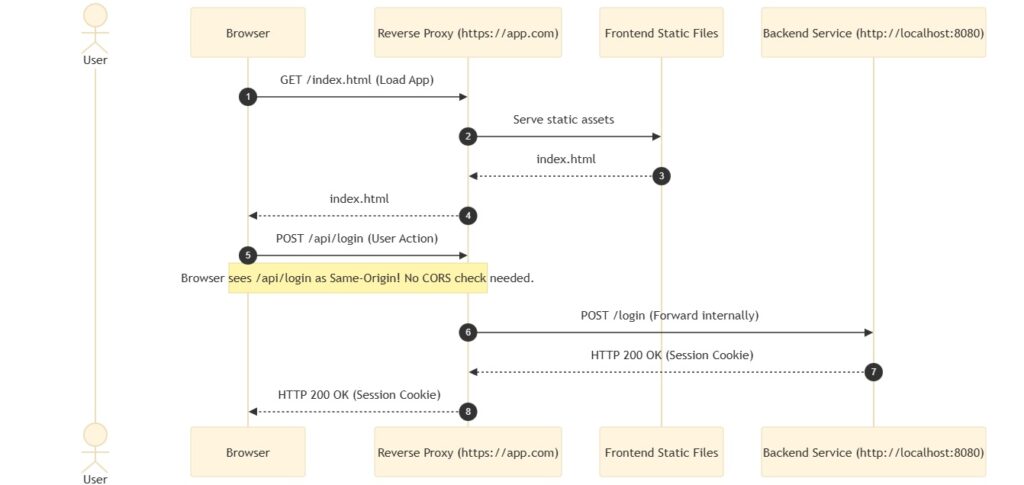
In this setup, the client interacts solely with the proxy at https://app.com. When the browser requests /api/v1/users, Nginx routes the traffic internally to http://localhost:8080 (which is invisible to the user). Because the browser sees both requests coming from https://app.com, the request is classified as same-origin, completely bypassing the need for CORS.
location /api/ {
    proxy_pass http://backend-service.internal/;
    proxy_set_header Host $host;
    proxy_set_header X-Real-IP $remote_addr;
}
B. API Gateway Handling
In microservice architectures with hundreds of services, managing CORS policies across individual servers becomes unmanageable. An API Gateway (e.g., Kong, AWS API Gateway) acts as a centralized gatekeeper.
By applying security rules at the gateway level, you ensure consistent access control, consolidate logging, reduce latency, and offload CORS header overhead from your backend microservices.
8. Summary and Key Takeaways
- SOP is a foundational security shield that prevents malicious domains from accessing cookies and session data from trusted domains.
- CORS is a server-controlled mechanism that selectively relaxes SOP security boundaries using response headers.
- Preflight OPTIONS requests act as a critical handshake, validating permissions before executing potentially data-altering methods (like
PUTorDELETE) or sending custom headers. - Avoid wildcard headers (
*) for APIs that process user authentication, credentials, or confidential databases. - Reverse proxies and API gateways simplify scale-level development by centralizing header rules and masking backend servers behind a single domain.
9. Interview Questions and Answers (Q&A)
Q1: What is the primary difference between a simple request and a preflight request?
Answer: A simple request is sent directly to the server without prior validation because it uses standard HTTP methods (GET, POST, HEAD) and safe-listed headers. A preflight request uses the OPTIONS method to verify safety permissions before sending the actual request, triggered by custom headers (like Authorization) or modern content types (like application/json).
Q2: What happens if a server returns Access-Control-Allow-Origin: * when the client requests resources with Access-Control-Allow-Credentials: true?
Answer: The browser blocks the request and throws an error in the console. When credentials are required, the server must supply a specific origin domain instead of a wildcard.
Q3: How does a reverse proxy eliminate CORS issues?
Answer: A reverse proxy exposes the frontend application and the backend API under the same domain name (e.g., app.com and app.com/api). Because the browser determines origin based on the protocol, domain, and port, requests sent to the /api path are recognized as same-origin requests, rendering CORS configurations obsolete.
Q4: Why is returning Access-Control-Allow-Origin by echoing the request’s Origin header dynamically considered dangerous?
Answer: Echoing the request’s origin without validating it against a whitelist behaves exactly like using a wildcard domain. It permits any website to load your API resources with credentials enabled, leaving your application vulnerable to CSRF and credential theft.
Q5: Can CORS protect your API from being scraped by CLI clients like curl or Postman?
Answer: No. CORS is strictly a browser-enforced security policy. Command-line utilities, backend servers, and API clients like Postman do not honor CORS headers and will successfully retrieve the data. To protect APIs from scraping, you must implement backend security mechanisms like API keys, rate-limiting, and OAuth2 authentication.