

 Ashish Sharma
What Is a Load Balancer and Why Do You Need One?
When an application starts with a single server, everything feels simple. The server receives requests, processes database queries, and returns responses. However, as traffic surges, this single machine quickly hits physical limits in CPU, memory, and network throughput. Consequently, that machine becomes both a severe performance bottleneck and a dangerous Single Point of Failure (SPOF). If that single server crashes, your entire business goes offline.
A load balancer resolves this vulnerability by acting as an intelligent reverse proxy and traffic cop situated between your users and your fleet of backend servers. Instead of allowing client devices to connect directly to individual servers, the load balancer accepts incoming requests and distributes them evenly across healthy backend instances.
[Clients]  --->  [ Load Balancer ]  --->  [ Server 1 ]
                                   --->  [ Server 2 ]
                                   --->  [ Server 3 ]
As a result, your system achieves three foundational architectural goals:
- High Availability and Fault Tolerance: The load balancer continually monitors server health. If an individual machine fails or crashes, the load balancer immediately redirects traffic away from the faulty instance to operational servers without disrupting end users.
- Horizontal Scalability: You can easily add or remove servers behind the load balancer as demand dictates. The public entry point never changes, enabling elastic scale without service interruptions.
- Optimized Resource Utilization: By spreading work across multiple machines, the system avoids hot-spotting, reduces latency, and delivers a consistent user experience.
Architectural Diagram: How Traffic Flows
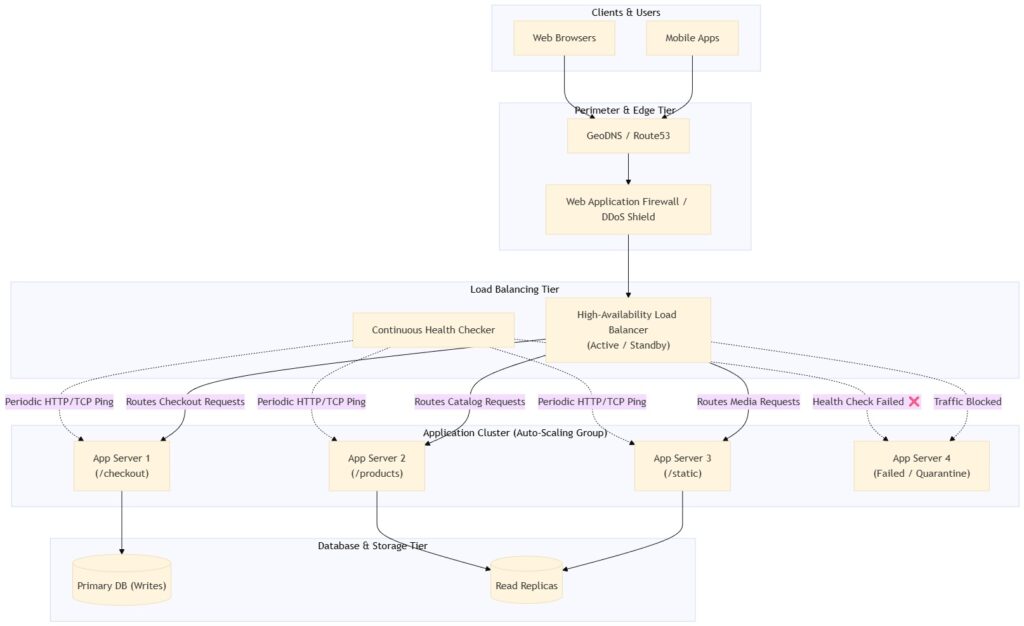
Below is an end-to-end architectural diagram illustrating how a modern load balancer coordinates incoming client traffic, verifies server health, and dispatches requests intelligently across application and database tiers.
Types of Load Balancers: Layer 4 vs. Layer 7
Engineers categorize load balancers along two primary dimensions: the network layer where routing decisions happen and the infrastructure deployment model.
1. Classification by Network Layer
Layer 4 (Transport Layer)
Layer 4 load balancers make routing decisions using transport-level parameters such as source IP, destination IP, TCP/UDP ports, and protocol flags. Crucially, a Layer 4 load balancer never inspects the payload or application data.
- How it works: The load balancer handles the TCP handshake and translates network packets (NAT) straight to a backend IP without reading the underlying HTTP request.
- Key advantages: Because it performs minimal packet parsing, it delivers lightning-fast throughput, uses negligible CPU overhead, and achieves ultra-low latency.
- Ideal use case: High-volume streaming, VoIP, gaming servers, raw TCP databases, or scenarios handling millions of concurrent raw connections.
- Examples: AWS Network Load Balancer (NLB), HAProxy in TCP mode, Linux Virtual Server (IPVS).
Layer 7 (Application Layer)
Layer 7 load balancers operate at the highest level of the OSI stack. Consequently, they understand application-layer protocols like HTTP, HTTPS, HTTP/2, gRPC, and WebSockets.
- How it works: The load balancer terminates the TCP connection, decrypts the TLS/SSL layer, and inspects headers, cookies, URL paths, and query parameters before picking a destination server.
- Key advantages: It enables context-aware, intelligent traffic routing. For instance, the load balancer can send
/api/paymentsrequests to payment microservices while routing/images/*requests to an optimized static asset cluster. - Trade-off: Terminating TLS and parsing HTTP payloads requires more compute and introduces slightly higher latency than raw packet forwarding.
- Examples: AWS Application Load Balancer (ALB), Nginx, Traefik, Envoy.
| Feature | Layer 4 (Transport Layer) | Layer 7 (Application Layer) |
|---|---|---|
| OSI Layer | Layer 4 (TCP / UDP) | Layer 7 (HTTP / HTTPS / gRPC) |
| Routing Criteria | IP address and port number | URL paths, headers, cookies, query parameters |
| TLS / SSL Termination | Pass-through only (typically) | Supported with full inspection |
| Throughput & Speed | Extremely fast, ultra-low latency | Fast, but consumes more CPU cycles |
| Intelligence | Basic connection forwarding | Rich, context-aware traffic management |
| Typical Tools | AWS NLB, IPVS, HAProxy (L4) | AWS ALB, Nginx, Envoy, Traefik |
2. Classification by Deployment Model
- Hardware Appliances: Vendors supply proprietary hardware racks equipped with custom ASICs and network processors (e.g., F5 BIG-IP, Citrix ADC). While they deliver immense physical throughput and specialized enterprise networking features, they demand high capital expenditures and lack elastic cloud integration.
- Software Load Balancers: Open-source software solutions (such as Nginx, HAProxy, and Envoy) run on standard Linux virtual machines or inside Docker containers. Modern engineering teams prefer software balancers because they cost less, integrate seamlessly with CI/CD pipelines, and adapt readily to Kubernetes.
- Cloud-Managed Services: Major cloud providers supply fully managed distributed balancing services (such as AWS Elastic Load Balancing, Google Cloud Load Balancing, and Azure Load Balancer). These services automatically manage capacity, scale horizontally behind the scenes, provision certificates, and eliminate manual maintenance.
Load Balancing Algorithms: How Routing Decisions Are Made
Once traffic arrives at the load balancer, a configured algorithm determines which specific server receives each request. We divide these algorithms into static rule-based strategies and dynamic adaptive strategies.
Static & Rule-Based Algorithms
1. Round Robin
The load balancer steps through a list of servers sequentially in a fixed circular order (Server1→Server2→Server3→Server1).
- Best used when: All backend servers share identical hardware specs and incoming requests require roughly equal processing effort.
- Limitation: If one server handles several computationally heavy queries simultaneously, simple Round Robin keeps sending it new requests, leading to server exhaustion.
2. Weighted Round Robin
Engineers assign numerical weights to each backend server reflecting its hardware capacity (e.g., Server A has weight 3; Server B has weight 1).
- Operation: Server A receives 3 requests for every 1 request routed to Server B.
- Best used when: Your fleet contains heterogeneous machines with different CPU or RAM configurations.
3. IP Hash (Sticky Sessions)
The algorithm calculates a mathematical hash based on the client’s source IP address and maps that hash to a specific server.
- Operation: The exact same client reliably hits the exact same server across multiple visits.
- Best used when: Stateful legacy applications store user session data directly in server local memory instead of an external cache like Redis.
Dynamic & Adaptive Algorithms
4. Least Connections
The load balancer continuously tracks how many open connections each server currently holds. Whenever a new request arrives, the load balancer dispatches it to the server with the fewest active connections.
- Best used when: Request durations vary wildly, such as applications running long SQL queries, document generation, or persistent WebSocket streams.
5. Least Response Time
This method combines active connection counts with server response latency. Specifically, the load balancer selects the server that responds the fastest while maintaining the lowest active load.
- Best used when: You prioritize end-user response times and backend server speeds fluctuate across regions or physical racks.
6. Resource-Based (Adaptive) Balancing
The load balancer queries monitoring daemons running on the backend instances to inspect live CPU utilization, memory pressure, and network throughput.
- Operation: If an application server encounters a garbage-collection pause or elevated CPU load, the load balancer automatically dials down traffic to that machine until metrics normalize.
Real-World Use-Case Scenarios
Scenario 1: Handling a Flash Sale on an E-Commerce Platform
During a nationwide flash sale, an e-commerce platform experiences a jump from 5,000 to 500,000 requests per second within minutes.
- The Solution: A Layer 7 load balancer acts as the front door. It performs SSL termination so backend servers avoid encryption overhead.
- Routing: It inspects request paths and directs
/checkouttraffic to an isolated, high-compute checkout cluster, while sending/catalogand/productbrowsing traffic to auto-scaled read-only instances. - Result: Heavy checkout traffic never degrades the catalog browsing experience, and the site remains fully operational under peak load.
Scenario 2: Microservices and API Gateways
Modern cloud platforms break monolithic applications into dozens of modular microservices.
- The Solution: An ingress controller (such as Envoy or Traefik) inspects incoming HTTP headers, auth tokens, and URL paths.
- Routing: The load balancer sends version 1 requests (
api.service.com/v1) to the existing fleet, while simultaneously routing canary testing traffic (api.service.com/v2) to a newly deployed set of containers based on HTTP cookies.
Scenario 3: Real-Time Multiplayer Gaming and Streaming
Real-time applications demand millisecond-grade responsiveness and sustain millions of simultaneous open sockets.
- The Solution: Engineers place a Layer 4 Network Load Balancer (NLB) in front of the UDP game servers.
- Routing: The NLB forwards raw UDP packets straight to backend game nodes based on source IPs and port numbers without payload inspection, guaranteeing minimum latency and maximum frame rates.
Security and Reliability Superpowers
Beyond basic traffic dispatching, modern load balancers provide essential defense and reliability capabilities:
- SSL/TLS Termination: The load balancer decrypts incoming HTTPS traffic at the perimeter and passes unencrypted HTTP to backend servers inside a private Virtual Private Cloud (VPC). Consequently, backend servers free up significant CPU cycles for business logic, and DevOps engineers centralize certificate renewals in one place.
- DDoS Mitigation & Rate Limiting: Because the load balancer sits directly on the public edge, it filters volumetric SYN floods, slowloris attacks, and repetitive brute-force requests before they reach core servers.
- Web Application Firewall (WAF) Integration: Layer 7 balancers integrate directly with firewalls to inspect incoming HTTP payloads for SQL injection, Cross-Site Scripting (XSS), and malicious bot signatures.
- Active Health Probing: The load balancer regularly checks health probe endpoints (such as
GET /healthz). When an instance returns HTTP 500 errors or fails three consecutive TCP pings, the load balancer immediately pulls that instance out of rotation until it recovers.
Decision Framework: Choosing the Right Solution
Use this quick decision framework when designing your system:
Do you need content-based routing (URLs, cookies, headers) or SSL termination?
├── YES ──> Choose a Layer 7 Load Balancer (e.g., AWS ALB, Nginx, Envoy)
└── NO  ──> Need maximum raw throughput and ultra-low latency for TCP/UDP?
            ├── YES ──> Choose a Layer 4 Load Balancer (e.g., AWS NLB, HAProxy TCP, IPVS)
            └── NO  ──> Simple uniform workload? ──> Standard Round Robin over L4/L7
- Select Managed Cloud Services (AWS ELB / GCP Cloud LB / Azure LB) when you prioritize automatic scaling, built-in high availability, and minimal operational maintenance.
- Select Software Solutions (Nginx / HAProxy / Envoy) when you require granular configuration control, multi-cloud portability, or run workloads inside Kubernetes clusters.
- Select Hardware Appliances (F5 / NetScaler) strictly for specialized on-premise enterprise data centers governed by strict regulatory constraints or custom ASIC hardware acceleration needs.
Key Takeaways
- Eliminate Single Points of Failure: Load balancers transform fragile single-server setups into resilient, auto-scaling, and highly available architectures.
- Know Your Layers: Layer 4 focuses on speed and raw packet distribution (IP/Port), whereas Layer 7 enables smart, application-aware routing (URLs, Headers, Cookies).
- Match Algorithms to Workloads: Use Round Robin for uniform servers, Least Connections for variable-length requests, and Resource-Based strategies for unpredictable dynamic traffic.
- Enforce Edge Security: Leverage your load balancing tier for centralized SSL termination, active health checking, and perimeter DDoS defense.