

 Ashish Sharma
Introduction: What Is Auto-Scaling and Why Does It Matter?
Modern applications rarely face constant, predictable traffic. An e-commerce platform might experience a sudden influx of shoppers during a flash sale, whereas an enterprise accounting tool might see virtually zero traffic at midnight. When systems encounter unpredictable demand spikes, systems engineers cannot manually add or remove servers quickly enough to keep services running smoothly.
Auto-scaling solves this fundamental operational challenge. It automatically provisions or deprovisions computing resources in real time to match incoming application workload.
Traffic Surges  ───►  Auto-Scaling Adds Compute  ───►  Zero Downtime & Fast Response
Traffic Drops   ───►  Auto-Scaling Cuts Capacity ───►  Zero Wasted Cloud Spend
However, auto-scaling delivers far more than simple traffic handling. Crucially, it balances three foundational pillars of cloud architecture:
- High Availability: Your application stays online even when visitor traffic surges tenfold.
- Consistent Performance: Users experience low latency because your servers never choke under resource exhaustion.
- Cost Efficiency: You only pay for active infrastructure, avoiding costly idle servers during low-traffic periods.
In modern architectures—such as microservices, cloud-native deployments, and event-driven systems—workloads can fluctuate dramatically within minutes. Auto-scaling transforms infrastructure from a static constraint into an elastic, responsive runtime.
How Auto-Scaling Works: The Continuous Feedback Loop
Auto-scaling operates as a continuous closed-loop control mechanism. Instead of making arbitrary guesses, cloud orchestrators continuously gather signals, evaluate thresholds, and trigger automated capacity adjustments.
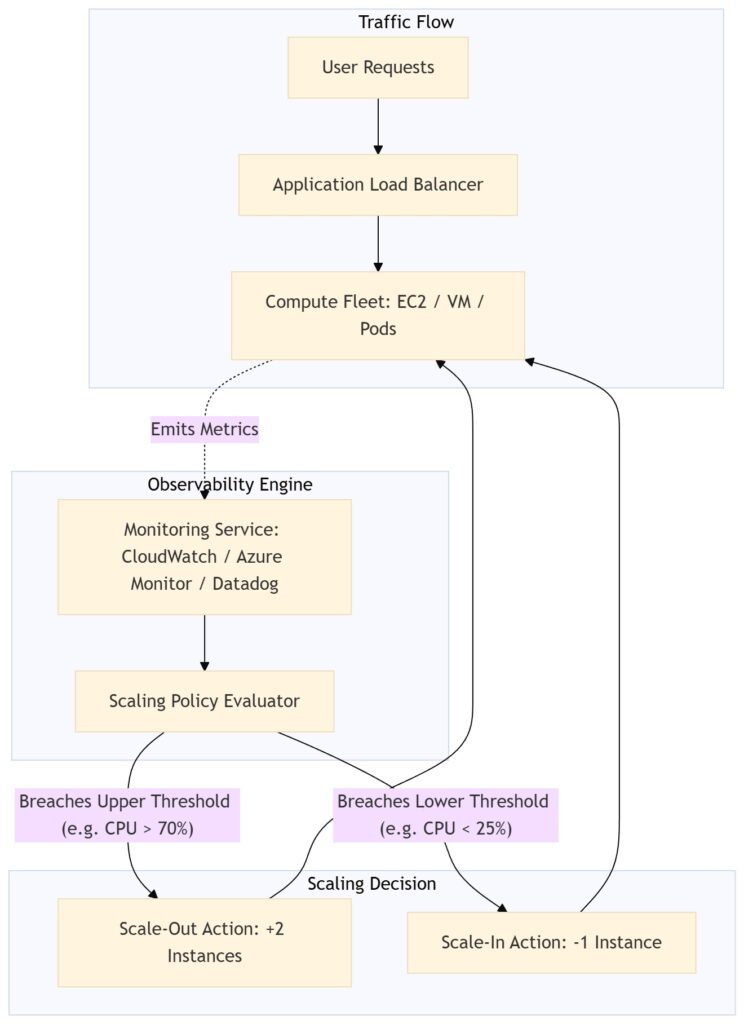
The Three Phases of the Feedback Loop:
- Continuous Observability: Cloud monitoring agents collect vital operational telemetry, including CPU utilization, memory pressure, active network connections, and message queue depths.
- Policy Evaluation: The scaling engine compares current metrics against predefined threshold rules or machine-learning-based forecasts.
- Automated Remediation: If metrics breach specified boundary conditions, the control plane immediately provisions new instances or cleanly terminates idle compute nodes.
Scaling Mechanisms: Horizontal vs. Vertical Scaling
When systems experience increased demand, architects can scale computing power in two distinct dimensions: horizontally or vertically.
| Feature | Horizontal Scaling (Scale-Out / Scale-In) | Vertical Scaling (Scale-Up / Scale-Down) |
|---|---|---|
| Core Action | Adds or removes instances/nodes/pods. | Adds or removes CPU/RAM on an existing machine. |
| Downtime | Zero downtime; uses load balancers to route traffic. | Frequently requires a restart or brief service interruption. |
| Hardware Limits | Virtually limitless; scales across multiple availability zones. | Strictly bounded by single-server hardware capacity limits. |
| Architecture Fit | Perfect for stateless microservices and web frontends. | Suitable for legacy monoliths and specialized relational databases. |
| Resilience | High; failure of one node does not crash the system. | Lower; retains a single point of failure (SPOF). |
Cloud-native architects almost universally prefer horizontal scaling for distributed workloads due to its elasticity, resilience, and seamless integration with load balancers.
Scaling Policies: Choosing the Right Trigger Strategy
Not all workloads behave identically; therefore, cloud platforms provide multiple policy options to handle diverse traffic dynamics.
                    ┌──► Reactive Scaling    (Trigger: Real-time metric spikes)
                    ├──► Scheduled Scaling   (Trigger: Pre-planned business hours)
Scaling Strategies ─┼──► Predictive Scaling  (Trigger: ML pattern analysis)
                    └──► Event-Driven        (Trigger: Queue backlog depth)
A. Reactive Scaling (Dynamic Thresholds)
Reactive policies evaluate real-time signals and trigger actions when a metric crosses a target threshold (e.g., maintaining average CPU utilization at 60%).
- Advantage: Simple to configure and reliably catches unexpected spikes.
- Drawback: Because virtual machines take several minutes to boot and register with load balancers, reactive scaling responds only after traffic has already risen, potentially causing temporary latency.
B. Scheduled Scaling
Scheduled policies adjust compute boundaries according to explicit date and time parameters.
- Advantage: Completely avoids warm-up latency.
- Example: A B2B banking application schedules compute capacity to scale out every weekday at 08:30 AM and scale in every evening at 07:00 PM.
C. Predictive Scaling (Machine Learning Forecasts)
Predictive scaling uses machine learning models to analyze multi-week historical traffic curves, identify daily and weekly seasonality, and forecast future demand.
- Advantage: Cloud platforms provision servers 15–30 minutes before predicted traffic waves arrive, effectively neutralizing warm-up lag.
D. Event-Driven Scaling (Custom Metrics & Queue Depths)
Instead of relying solely on host-level metrics, event-driven scaling monitors message brokers (such as AWS SQS, Apache Kafka, or Azure Service Bus).
- Advantage: If workers process jobs asynchronously, scaling based on the backlog message count (queue depth) ensures rapid job completion long before CPU counters max out.
Auto-Scaling Across Major Cloud Providers
Modern cloud providers furnish mature, turn-key auto-scaling mechanisms across VMs, container clusters, and serverless runtimes.
| Cloud Provider | Virtual Machine Scaling | Container Orchestration Autoscaling | Serverless Scaling | Native Observability |
|---|---|---|---|---|
| Amazon Web Services (AWS) | EC2 Auto Scaling Groups (ASG) | ECS Service Auto Scaling & EKS (HPA / Karpenter) | AWS Lambda (Concurrency controls) | Amazon CloudWatch |
| Microsoft Azure | Virtual Machine Scale Sets (VMSS) | Azure Kubernetes Service (AKS with HPA & KEDA) | Azure Functions | Azure Monitor |
| Google Cloud Platform (GCP) | Managed Instance Groups (MIGs) | Google Kubernetes Engine (GKE HPA & Autopilot) | Google Cloud Run / Cloud Functions | Cloud Monitoring |
- Amazon Web Services (AWS): Coordinates EC2 instances inside Auto Scaling Groups (ASGs) driven by CloudWatch alarms. In container environments, AWS ECS and EKS utilize Target Tracking and Kubernetes Horizontal Pod Autoscaling (HPA).
- Microsoft Azure: Uses Virtual Machine Scale Sets (VMSS) with metric rules configured in Azure Monitor. Containerized apps run inside Azure Kubernetes Service (AKS) leveraging KEDA (Kubernetes Event-driven Autoscaling) to scale pods down to zero.
- Google Cloud Platform (GCP): Deploys Managed Instance Groups (MIGs) that support autoscaling policies based on CPU, load balancing serving capacity, or Cloud Monitoring metrics. Furthermore, Google Cloud Run automatically scales HTTP containers from zero to thousands of instances seamlessly.
Real-World Use Cases & Practical Scenarios
Scenario 1: E-Commerce Black Friday Flash Sale
- Problem: A digital retailer expects visitor traffic to multiply by 40x within five minutes of launching a promotional campaign.
- Solution: The engineering team combines scheduled scaling with predictive scaling. Two hours before the event, the orchestrator preemptively provisions baseline capacity across multiple Availability Zones. Furthermore, reactive target-tracking policies remain active to absorb unexpected spillover traffic safely.
Scenario 2: High-Volume Video Transcoding (Queue-Based)
- Problem: Users upload thousands of raw video files intermittently throughout the day. Processing instances must not sit idle overnight.
- Solution: The architecture routes raw uploads to an AWS SQS queue. An Auto Scaling Group monitors the backlog depth metric (
ApproximateNumberOfMessagesVisible). As users queue videos, the policy spins up disposable worker nodes. Once workers drain the queue, the orchestrator scales the worker pool back to zero.
Scenario 3: B2B Enterprise ERP Microservices
- Problem: Internal enterprise employees generate heavy database queries strictly during office hours (Monday to Friday, 9:00 AM to 6:00 PM).
- Solution: Administrators configure cron-based scheduled scaling policies across the Kubernetes cluster. The cluster scales down non-essential internal microservices to a minimal single replica during weekends, cutting monthly compute costs by more than 50%.
Cost Optimization Strategies for Cloud Scaling
Auto-scaling can inflate cloud bills if configured carelessly. To achieve true cost efficiency, cloud architects enforce the following best practices:
                      ┌──► 1. Leverage Spot / Preemptible Instances
                      ├──► 2. Right-Size Workloads Before Scaling
Cost Optimization ────┼──► 3. Implement Scale-to-Zero Runtimes
                      ├──► 4. Establish Hard Quotas & Upper Guardrails
                      └──► 5. Configure Cooldown & Stabilization Windows
- Leverage Spot and Preemptible Instances: Cloud providers offer spare compute capacity at discounts of up to 90% (AWS Spot Instances and GCP Preemptible/Spot VMs). Take advantage of these instances for stateless, fault-tolerant batch workers.
- Right-Size Before You Scale: Scaling an oversized instance (e.g., running an 8-core VM for an application that uses 300MB of RAM) amplifies financial waste. Regularly audit CPU/RAM footprints and downscale base instance types before applying auto-scaling rules.
- Embrace Scale-to-Zero: Deploy infrequent or bursty workloads on serverless platforms (e.g., AWS Lambda, GCP Cloud Run, or Azure Container Apps). These services terminate compute entirely when requests cease, incurring zero charges during idle windows.
- Establish Hard Upper Limits: Always set a strict
MaximumInstancesthreshold in your scaling configuration. Without hard boundaries, an external denial-of-service (DDoS) attack or an infinite execution loop could trigger limitless horizontal scaling, creating catastrophic billing surprises. - Tune Cooldown Periods (Anti-Flapping): Ensure your scaling engine enforces cooling-off periods (e.g., 300 seconds). Without cooldown periods, a temporary 10-second traffic spike might trigger an aggressive scale-out, immediately followed by a scale-in, causing resource thrashing and instability.
Failing to define maximum instance boundaries (
MaxCapacity) can lead to run-away scaling during denial-of-service attacks or software logic errors, producing massive unexpected cloud invoices.
Common Pitfalls and Mitigation Strategies
- The Cold-Start Dilemma: New virtual machines or large Java/Node container images can require minutes to download and initialize.
- Fix: Use lightweight base container images (e.g., Alpine or Distroless), bake pre-warmed golden AMIs/VM images, or utilize serverless provisioned concurrency.
- Database Bottlenecks: While front-end application layers scale horizontally in seconds, backing relational databases (e.g., PostgreSQL or MySQL) can quickly hit maximum connection limits.
- Fix: Introduce managed database connection poolers (such as AWS RDS Proxy or PgBouncer) and deploy caching layers (Redis/Memcached) to shield databases from sudden surges.
- Cascading Failures & Crash Loops: If newly provisioned nodes crash on boot due to misconfigured health checks, the load balancer continuously marks them unhealthy and commands the autoscaler to create more, trapping the cluster in an expensive crash loop.
- Fix: Implement graceful startup probes and alert on continuous failure loops.
Summary and Key Takeaways
- Auto-scaling is an architectural principle, not just a cloud vendor tool. It ensures applications stay resilient, responsive, and cost-effective under shifting demands.
- Observability drives intelligent scaling. Without accurate signals (queue depths, request rates, latency), scaling systems risk reacting too late or for the wrong reasons.
- Balance technical performance with fiscal governance. The most successful auto-scaling implementations leverage predictive scaling for anticipated peaks, reactive scaling for safety nets, and aggressive cost optimizations like spot fleets and scale-to-zero.