

 Ashish Sharma
Introduction: Why Performance Defines System Success
No money? No problem! Help us pay the cloud hosting bills without opening your wallet—just give
this ad link a click!😉💸
Building a system that works on your local machine is simple. However, building an architecture that scales gracefully under thousands of concurrent users requires a fundamentally different engineering mindset.
In system design, performance represents far more than raw speed. A system can respond instantaneously when five users access it, yet crash disastrously under real-world traffic. Therefore, software architects evaluate performance by examining how efficiently a platform continues to serve traffic as user demand multiplies.
In this comprehensive guide, we will explore:
- The core pillars of system performance: Speed, Capacity, and Efficiency.
- The critical trade-offs between Latency vs. Throughput and Scalability vs. Responsiveness.
- How to define and monitor SLAs, SLOs, and SLIs.
- Why averages lie and why P95 and P99 tail latency dictate user happiness.
- Core performance testing methodologies and continuous monitoring tools.
- Real-world architectural strategies, diagrams, concrete use cases, and essential interview questions.
The Three Lenses of System Performance
To evaluate system performance accurately, software architects analyze three distinct dimensions:
                      ┌────────────────────────┐
                      │   SYSTEM PERFORMANCE   │
                      └───────────┬────────────┘
                                  │
         ┌────────────────────────┼────────────────────────┐
         ▼                        ▼                        ▼
  ┌──────────────┐         ┌──────────────┐         ┌──────────────┐
  │    SPEED     │         │   CAPACITY   │         │  EFFICIENCY  │
  │ (Wait Time)  │         │  (Workload)  │         │ (Resources)  │
  └──────────────┘         └──────────────┘         └──────────────┘
- Speed (Latency): Measures the elapsed time before a user receives a response. For example, when a shopper clicks “Checkout,” speed determines the wait time in milliseconds.
- Capacity (Throughput): Measures the total volume of work a system processes over a given timeframe. Engineers measure capacity in requests per second (RPS), transactions per second (TPS), or concurrent connected users.
- Efficiency (Resource Utilization): Evaluates how effectively software consumes physical and virtual hardware—such as CPU cycles, memory buffers, solid-state disk I/O, and network bandwidth.
The Architectural Conflict
These three dimensions frequently compete against one another. For instance, developers can accelerate speed by provisioning redundant in-memory caches, but this approach inflates infrastructure costs and architectural complexity. Conversely, you can expand system capacity by batching network transactions, yet batching directly degrades individual response speeds.
Consequently, performance engineering is not a single checkbox you inspect once and forget. Instead, it demands a continuous balancing act among responsiveness, scalability, and resource cost.
Latency vs. Throughput: Two Halves of the Same Coin
Engineers frequently bundle latency and throughput into the same sentence, yet they answer two completely different questions.
| Dimension | Core Question | Standard Unit | Key Engineering Driver |
|---|---|---|---|
| Latency | “How long does one request take?” | Milliseconds (ms) / Microseconds (μs) | Optimizing code paths, caching, reducing network hops |
| Throughput | “How much total work can we complete over time?” | Requests per second (RPS) / Trans. per second (TPS) | Horizontal concurrency, batching, asynchronous queues |
The Highway Analogy
Consider a multi-lane highway:
- Latency represents the travel speed of a single car traveling from Point A to Point B.
- Throughput represents the total number of vehicles passing under a toll booth every hour.
If highway authorities widen the road from two lanes to eight lanes, they dramatically boost throughput. However, widening the road does not increase the speed limit; thus, latency for an individual car remains identical.
Low-Latency (Fast Delivery):
Client  ───(5ms API Call)───► Server ───(Instant Response)───► Client

High-Throughput (Massive Volume):
Client 1 ──┐
Client 2 ──┼──► [Queue / Worker Pool] ──► Batch Process (10,000 req/sec)
Client 3 ──┘
Real-World Use Cases
- Low-Latency Priority: High-Frequency Trading (HFT) platforms, multiplayer online games, and live video conferencing engines prioritize latency above all else. In these systems, a delay of 50 milliseconds causes financial slippage or visual lag.
- High-Throughput Priority: Big-data analytics engines, end-of-day banking reconciliation pipelines, and log ingestion platforms (like Apache Kafka) prioritize throughput. Users gladly accept a five-second execution window if the pipeline reliably digests millions of records per minute.
Scalability vs. Responsiveness
While scalability and responsiveness appear synonymous, they solve entirely different problems:
- Scalability represents capacity for growth: When user accounts surge from 10,000 to 10,000,000, can your infrastructure scale up (vertically adding RAM and CPU cores) or scale out (horizontally provisioning stateless servers) without collapsing?
- Responsiveness represents perceived user experience: Regardless of total platform traffic, does the application complete user tasks swiftly?
The Hidden Trap: Scalable yet Unresponsive
Scalability never guarantees responsiveness. An engineering team can build an e-commerce platform that successfully processes 50,000 orders simultaneously without throwing errors. However, if database locking forces each shopper to wait 12 seconds for an order confirmation, the system is highly scalable but painfully unresponsive.
Therefore, mature engineering teams implement techniques such as:
- Reverse proxies and load balancers (NGINX, Envoy) to balance workloads evenly.
- Edge Content Delivery Networks (CDNs) (Cloudflare, AWS CloudFront) to terminate TLS connections near the user.
- Distributed in-memory caches (Redis, Memcached) to eliminate repeated database round-trips.
- Asynchronous event-driven messaging (Apache Kafka, RabbitMQ) to move non-critical compute tasks out of the critical user request path.
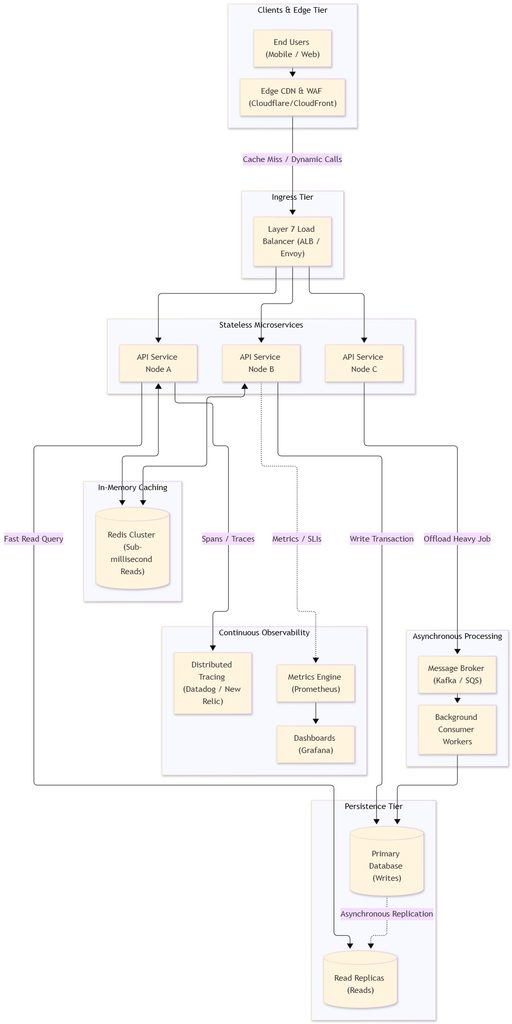
High-Performance System Architecture
The following diagram illustrates how modern architectures balance latency, throughput, scalability, and observability:
Measuring Performance: SLAs, SLOs, and SLIs
You cannot manage what you do not measure. To evaluate production health, engineering teams establish three operational agreements:
               CONTRACT                      TARGET                      REALITY
          ┌─────────────────┐         ┌─────────────────┐         ┌─────────────────┐
          │       SLA       │         │       SLO       │         │       SLI       │
          │ Service Level   │  ───►   │ Service Level   │  ───►   │ Service Level   │
          │ Agreement       │         │ Objective       │         │ Indicator       │
          └─────────────────┘         └─────────────────┘         └─────────────────┘
          "Business Promise"          "Engineering Goal"         "Live System Data"
- Service Level Agreement (SLA): The contractual commitment you make to external customers. Breaching an SLA results in severe financial penalties, service credits, or customer churn (e.g., “We guarantee 99.9% monthly availability”).
- Service Level Objective (SLO): The internal engineering target that keeps your platform safely ahead of SLA thresholds. SLOs give engineering teams an explicit benchmark to determine whether they can push new features or must halt deployments to stabilize the platform (e.g., “99% of user requests must complete in under 250 milliseconds”).
- Service Level Indicator (SLI): The empirical, real-time measurement collected by your monitoring agents (e.g., “Currently, 99.4% of API calls resolve in under 180 milliseconds”).
Rule of Thumb:
The SLA is your formal promise. The SLO is your internal target. The SLI is your system’s actual reality.
Why Averages Lie: The Critical Role of Percentiles
When engineers evaluate system latency, novice developers immediately look at the mathematical average (mean). Unfortunately, averages mask severe software bugs and degradation.
Consider a sample of 10 API requests: [50ms,52ms,48ms,55ms,51ms,49ms,53ms,50ms,48ms,4500ms]
The mathematical average indicates a response time of 490.6 ms, which might look acceptable on a high-level report. However, 9 out of 10 users experienced instantaneous 50 ms speeds, while one customer endured a catastrophic 4.5-second freeze. The average hides the outlier and paints an inaccurate picture of platform reliability.
To expose actual user experience, architects rely on percentiles:
- P50 (50th Percentile / Median): Denotes the exact midpoint of user experience. Fifty percent of requests complete faster than this number, and fifty percent complete slower.
- P95 (95th Percentile): Unmasks the slower tier of system interactions, capturing 19 out of every 20 requests.
- P99 (99th Percentile / Tail Latency): Pinpoints the slowest 1% of transactions. This metric reveals underlying bottlenecks such as garbage collection pauses, thread pool starvation, database lock contention, and network packet retransmissions.
Compounding Tail Latency in Distributed Systems
In modern microservice architectures, a single frontend request often fans out into 20 downstream microservice calls. If each microservice boasts an impressive 99% success rate, the probability that the client experiences a delayed response drops dramatically:
P(All 20 calls fast)=(0.99)20≈0.8179⟹81.8%
Consequently, nearly one out of every five user requests hits tail latency! Therefore, enterprise architects continuously track and optimize P95 and P99 percentiles rather than relying on averages.
Proactive Performance Testing: Discovering Limits Before Production
Because systems rarely break under baseline traffic, engineers intentionally inject synthetic stress into non-production environments using tools like k6, Apache JMeter, and Locust.
    Traffic
       ▲
       │                                     ┌── Spike Test (Sudden Surge)
       │                                ┌────┘
       │                           ┌────┘ Stress Test (Push past capacity)
       │                      ┌────┘
       │                 ┌────┘ Load Test (Normal Expected Peak)
       │            ┌────┘
       │  ──────────┴──────────────────────── Endurance Test (Sustained over time)
       └────────────────────────────────────────────────────────► Time
- Load Testing: Verifies whether the system sustains its anticipated operational peak while satisfying established SLO targets.
- Stress Testing: Deliberately floods the system with traffic beyond its design capacity to discover the exact architectural breaking point and observe how gracefully services degrade.
- Spike Testing: Evaluates resilience against instantaneous surges in demand, mimicking real-world scenarios such as ticket sales launching or viral social media mentions.
- Endurance (Soak) Testing: Sustains a moderate workload across an extended duration (e.g., 24 to 72 hours). This test surfaces slow-bleeding defects such as memory leaks, thread leaks, and database connection exhaustion.
Continuous Observability: Detecting Bottlenecks in Production
While testing stress-tests software before release, production monitoring provides continuous operational visibility into active workloads. Effective engineering teams combine three pillars of observability:
- Application Performance Monitoring (APM): Platforms like Datadog, Dynatrace, and New Relic instrument distributed transactions across diverse microservices. When a checkout request stalls, APM traces reveal precisely which SQL query or third-party payment gateway caused the delay.
- Time-Series Metrics: Solutions like Prometheus paired with Grafana aggregate infrastructure counters (CPU load, memory consumption, disk read queues, and active thread pools) to display real-time dashboards.
- Centralized Logging: Systems like Elasticsearch / Fluentd / Kibana (EFK) or Grafana Loki index stack traces and structured errors, allowing engineers to diagnose root causes during outages.
Architectural Strategies for Common Performance Challenges
Architects resolve performance bottlenecks and traffic spikes using the following core strategies:
┌─────────────────────────────────┬────────────────────────────────────────────────────────────────┐
│ Challenge                       │ Architectural Mitigation Strategy                              │
├─────────────────────────────────┼────────────────────────────────────────────────────────────────┤
│ Database Read Bottleneck        │ Provision Redis/Memcached; deploy DB Read Replicas.            │
├─────────────────────────────────┼────────────────────────────────────────────────────────────────┤
│ Sudden Traffic Surges           │ Implement Autoscaling (K8s HPA); buffer via SQS/Kafka.         │
├─────────────────────────────────┼────────────────────────────────────────────────────────────────┤
│ Cascading Microservice Outages  │ Apply Circuit Breaker patterns (Netflix Hystrix/Resilience4j). │
├─────────────────────────────────┼────────────────────────────────────────────────────────────────┤
│ Abusive Client Requests         │ Deploy Token Bucket Rate Limiting at the API Gateway.          │
├─────────────────────────────────┼────────────────────────────────────────────────────────────────┤
│ Cold Starts & Resource Spikes   │ Maintain warm connection pools; optimize container sizes.      │
└─────────────────────────────────┴────────────────────────────────────────────────────────────────┘
System Performance Interview Questions & Deep-Dive Answers
Question 1: What is the fundamental difference between latency and throughput?
Answer:
- Latency measures the elapsed duration required to process a single request from submission to delivery (measured in milliseconds).
- Throughput measures the aggregate volume of requests a system handles per time unit (measured in requests per second).
- Analogy: On a highway, latency is how fast a single automobile travels, while throughput is how many automobiles pass the checkpoint every hour. Optimizing for one often compromises the other; for example, batching data increases throughput but elevates latency for individual messages.
Question 2: How do SLAs, SLOs, and SLIs differ? Provide a real-world scenario.
Answer:
- SLA (Service Level Agreement): The contractual commitment signed with customers (e.g., “Platform guarantees 99.9% uptime per calendar month; otherwise, customers receive a 10% credit”).
- SLO (Service Level Objective): The internal engineering target (e.g., “99% of search API queries must return within 200 ms”).
- SLI (Service Level Indicator): The live, measured system metric (e.g., “Synthetic uptime probes currently report 99.96% success over the last 30 days”).
- Summary: The SLA represents the promise, the SLO represents the goal, and the SLI represents current reality.
Question 3: Why should engineers analyze percentiles (P95, P99) instead of simple averages?
Answer:
Mathematical averages mask catastrophic tail outliers. If 98 requests complete in 10 ms while 2 requests stall for 5,000 ms, the calculated average appears healthy, yet 2% of your paying customers suffered a terrible experience. P95 and P99 percentiles explicitly isolate tail latency, exposing critical production defects such as garbage collection freezes, lock contention, thread starvation, and slow database scans.
Question 4: What operational steps would you take to diagnose an unknown performance bottleneck?
Answer:
- Trace the critical request path: Inspect distributed tracing within your APM tool (e.g., Datadog) to isolate the slowest service span.
- Examine physical hardware metrics: Check Prometheus dashboards for saturations in CPU, memory swap, disk I/O wait, or socket limits.
- Analyze database operations: Check database slow-query logs, verify index utilization with
EXPLAIN ANALYZE, and review active connection pool limits. - Inspect cache metrics: Verify cache hit-to-miss ratios in Redis or Memcached.
- Simulate synthetic load: Run repeatable load tests using tools like k6 to replicate and isolate the bottleneck under controlled conditions.
Question 5: How do you safeguard responsiveness in an ultra-scalable distributed system?
Answer:
- Decouple slow write operations by adopting asynchronous message queues (Kafka, SQS) to process tasks outside the critical user journey.
- Implement aggressive multi-tiered caching (CDN at the edge, Redis for relational queries).
- Configure rate limiting and load shedding at your API Gateway to drop non-essential traffic during overload.
- Ensure microservices remain strictly stateless to enable rapid horizontal autoscaling via Kubernetes Horizontal Pod Autoscalers (HPA).
- Wrap third-party RPC calls in circuit breakers with fallback defaults to prevent cascading failure chains.
Question 6: Which tools and frameworks do you use for performance testing and live monitoring?
Answer:
- Testing: Use k6 or Locust for developer-friendly, code-driven load and stress scripts; use JMeter for complex enterprise protocol simulations.
- Metrics & Dashboards: Run Prometheus to scrape time-series metrics and Grafana to visualize real-time operations.
- APM & Tracing: Deploy Datadog, OpenTelemetry, or New Relic for end-to-end distributed transaction tracing.
- Client Monitoring: Use Real User Monitoring (RUM) and Google Core Web Vitals to quantify frontend page rendering speeds.
Question 7: How should an architect design an architecture to absorb unpredictable traffic spikes?
Answer:
- Offload static media and pre-rendered assets to a globally distributed CDN to prevent origin server overload.
- Configure reactive autoscaling policies (e.g., AWS Auto Scaling Groups or Kubernetes HPA) paired with predictive scaling algorithms.
- Place an asynchronous buffer queue (Kafka, RabbitMQ) ahead of write-heavy databases to flatten spike plateaus.
- Apply circuit breakers and bulkhead isolation so that an outage in one subsystem cannot bring down the core checkout or auth workflows.
- Implement client-side exponential backoff and jitter to avoid self-inflicted “thundering herd” denial-of-service loops.
Question 8: What are the primary trade-offs between performance and financial cost in cloud hosting?
Answer:
Maximum performance requires over-provisioning expensive cloud hardware (e.g., high memory instances, provisioned IOPS SSDs, multi-region clusters). Conversely, lean budgets risk performance penalties:
- Reserved vs. On-Demand: Reserved instances provide predictable computing power at lower unit costs, whereas serverless architectures optimize baseline spending but introduce cold-start latency.
- Aggressive Caching: Adding distributed Redis clusters increases memory costs, yet it significantly slashes expensive database compute and read replication overhead.
- Balanced Engineering: Teams must align infrastructure sizing directly with approved business SLOs rather than blindly over-provisioning hardware.
Key Takeaways: The Architect’s Checklist
- Treat performance as a day-one design requirement: Never postpone performance optimization until the end of your software lifecycle.
- Balance latency and throughput: Optimize individual request processing paths for latency-sensitive applications; leverage asynchronous batching and message queues for high-volume pipelines.
- Maintain internal alignment: Always synchronize your SLA (promise), SLO (target), and SLI (reality).
- Track the tail: Reject misleading arithmetic averages. Monitor P95 and P99 percentiles to safeguard your true user experience.
- Test before production, monitor continuously after release: Combine proactive stress testing with end-to-end distributed APM observability to keep systems resilient as traffic scales.